Get started
Set up X Bot
Add the bot to your group, type /setup, follow the wizard. Most setups finish in under two minutes.
Create your Telegram group
X Bot posts reports into a Telegram group. If you already have one, use it; otherwise create a fresh group for your project, KOL team, or community.
Add @BWS_X_Bot as admin
Search for @BWS_X_Bot in Telegram and add it to your group. Promote it to admin (no special permissions needed).
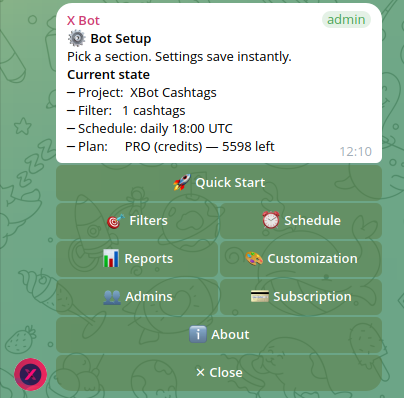
Type /setup in the group
The bot replies with an interactive menu showing every configuration option. Tap 🚀 Quick Start to begin a guided wizard.
/setup
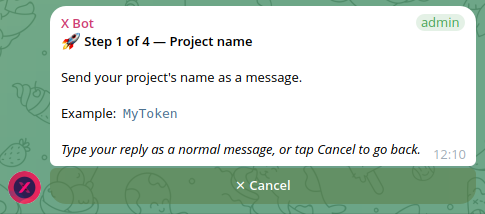
Quick Start — Project name
The wizard's first prompt asks for a project name. This is the title that will appear on reports and on your public XBot.ninja dashboard.
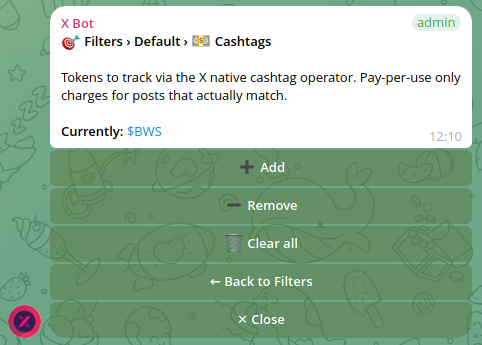
Quick Start — What to track on X
Pick accounts, cashtags, keywords — or a mix. See the use-case tips below for what to enter depending on what you're tracking.
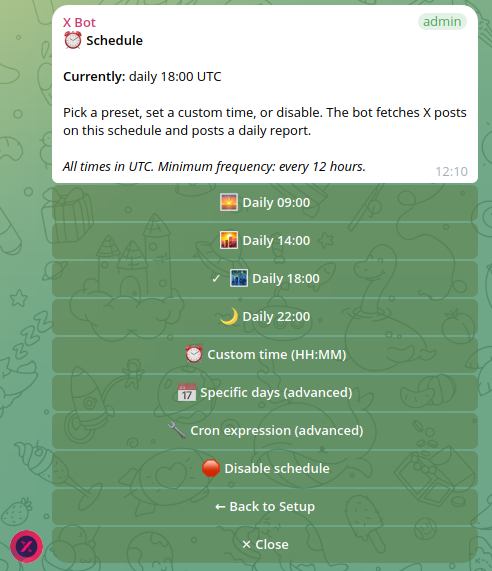
Quick Start — When the bot should run
Pick a daily preset (09:00 / 14:00 / 18:00 / 22:00 UTC) or send a custom time. The schedule is editable later from /setup → ⏰ Schedule.
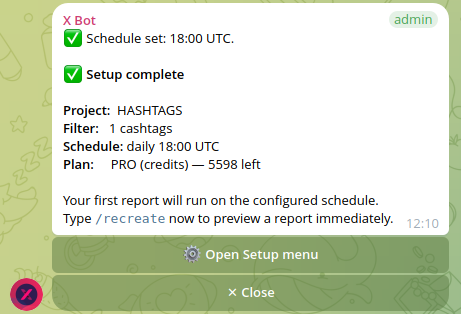
Done
The wizard summary lists everything you set up. Want to preview the first report immediately? Open /setup → 📊 Reports and tap Recreate report.
Tune anything later (Optional)
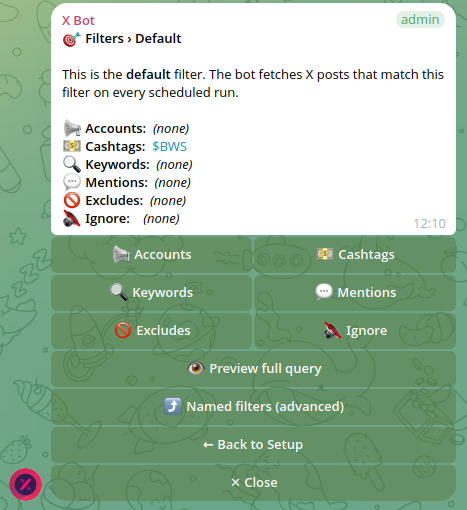
Re-open /setup any time to refine filters, customize colors and titles, manage admins, change the schedule, or buy more credits. Every setting is one or two taps away.
Tips for your use case
Pick the card that matches you — the full setup steps appear below.
Crypto Project / Community
Reward real engagement, not bots — rank community posts about your project on a transparent leaderboard.
Show setup steps →
Solo KOL / Influencer
Build a verified performance portfolio. Capture metrics across every campaign and share your dashboard with clients.
Show setup steps →
KOL Agency / Team
Verified engagement and reach for every KOL you hire. Daily reports, transparent ROI, no spreadsheets.
Show setup steps →
Crypto Project / Community — full setup
Create your Telegram group
If you don't already have one, create a fresh community / project chat where the daily report will land.
Add @BWS_X_Bot as admin
Search @BWS_X_Bot in Telegram and promote it to admin (no special permissions required).
Type /setup in the group
Tap 🚀 Quick Start.
Project name
Use your token / project name. Example: MyToken. This appears on every report and on the public dashboard.
What to track on X
Pick 💵 Cashtags and send your ticker, e.g. $YOUR_TOKEN. You can also add 🔍 Keywords — e.g. "your project name" "#YourHashtag".
When to run
For active communities, daily at 14:00 UTC works well. Pick whichever preset fits your time zone.
Done
Want a preview right now? Open /setup → 📊 Reports and tap Recreate report.
Tune anything later (Optional)
Add 📡 Auto-relay for selected accounts so big news lands in chat instantly. Add a leaderboard color scheme via 🎨 Customization.
Solo KOL / Influencer — full setup
Create your Telegram group
Create a private group for your reports — you can share the live XBot.ninja URL with clients without giving them group access.
Add @BWS_X_Bot as admin
Search @BWS_X_Bot in Telegram and promote it to admin.
Type /setup in the group
Tap 🚀 Quick Start.
Project name
Use your handle, brand, or a portfolio name — whatever you want clients to see on the report. Example: @your_handle Performance.
What to track on X
Pick 📢 Accounts and send your X handle: @your_username. The bot ranks every post you publish across the period.
When to run
Daily at 09:00 UTC gives you a fresh dashboard at the start of business hours in most US time zones.
Done
Open /setup → 📊 Reports and tap Recreate report to preview the first one immediately. Share the resulting XBot.ninja URL with prospective clients.
Tune anything later (Optional)
Use 🎨 Customization to set a logo, colours, and a custom URL list (LinkedIn, Press kit, etc.) on the dashboard.
KOL Agency / Team — full setup
Create your Telegram group
Create one group per campaign or per client — or use one shared group and split clients via Named filters in step 8.
Add @BWS_X_Bot as admin
Search @BWS_X_Bot in Telegram and promote it to admin.
Type /setup in the group
Tap 🚀 Quick Start.
Project name
Use the campaign name or client name. Example: MyToken Q2 KOL Campaign.
What to track on X
Pick 📢 Accounts and send every KOL handle space-separated: @KOL1 @KOL2 @KOL3. Then add the campaign cashtag via /setup → 🎯 Filters → Cashtags — e.g. $YOUR_TOKEN.
When to run
Daily at 22:00 UTC aligns with end-of-day reporting cycles. Adjust to your team's working hours via /setup → ⏰ Schedule.
Done
Open /setup → 📊 Reports → Recreate report to ship the first dashboard to the client today.
Tune anything later (Optional)
Track multiple clients in one Telegram group with 🎯 Filters → Named filters: each named set produces an independent report on the same schedule. Add 📡 Auto-relay for the campaign-critical handles so big posts land in chat instantly.