The /setup Menu: Full Guide to X Bot's Telegram UI
The fastest way to configure X Bot is the interactive /setup menu. It wraps every admin command behind a clickable, edit-in-place interface — no slash commands to memorise.
Quickest path: add the bot to your group, type
/setup, tap 🚀 Quick Start, and follow four prompts. You'll have a daily-report schedule running on a real filter in under two minutes.
What /setup looks like
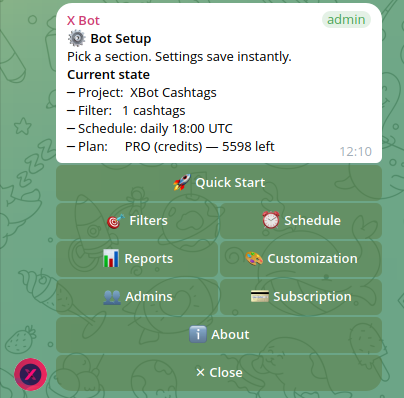
╔══════════════════════════════════════════════╗
║ ⚙️  Bot Setup                                ║
║                                              ║
║ Pick a section. Settings save instantly.     ║
║                                              ║
║ Current state                                ║
║ ─ Project:  MyToken                          ║
║ ─ Filter:   3 keywords · 2 cashtags          ║
║ ─ Schedule: daily 18:00 UTC                  ║
║ ─ Plan:     FREE — 47/100 credits left       ║
╠══════════════════════════════════════════════╣
║ [ 🚀 Quick Start ]                           ║
║ [ 🎯 Filters     ] [ ⏰ Schedule       ]      ║
║ [ 📊 Reports     ] [ 🎨 Customization  ]      ║
║ [ 👥 Admins      ] [ 💳 Buy Credits   ]      ║
║ [ ℹ️  About       ]                          ║
║ [ ✕ Close ]                                  ║
╚══════════════════════════════════════════════╝
Every screen shows your current state at the top so you know what's configured before you change anything. Every change saves instantly to the database — there's no "save" button to forget.
Quick Start wizard
Tap 🚀 Quick Start for a four-step linear flow that gets a fresh chat from "nothing configured" to "first scheduled report" with the minimum number of prompts. Skip and Exit are always available — a partly-completed wizard never blocks you, settings just stay at their defaults.
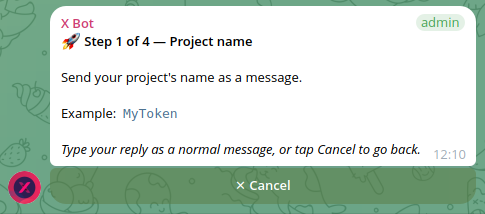
The four steps:
| Step | Asks | Saves to |
|---|---|---|
| 1 | Project name | ProjectName setting (used on reports, leaderboard cards, admin DMs) |
| 2 | What to track on X — accounts, cashtags, or keywords | The default filter's from, cashtags, or keywords array |
| 3 | When to post the daily report — 4 preset times or custom HH:MM | A scheduled job keyed to your chat |
| 4 | Done — summary screen with /recreate hint to preview now | (none) |
The full menu
Each top-level button opens a focused screen. Drill down freely — every screen has ← Back to the previous level and ✕ Close to dismiss.
🎯 Filters
What X posts the bot fetches on every scheduled run.
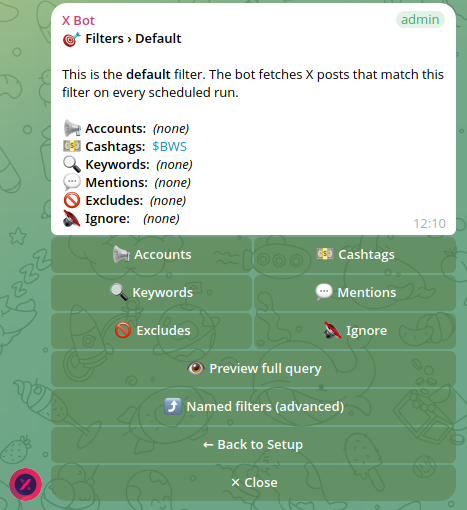
Tap any category to drill down. Excludes is checkbox-style — one tap toggles "exclude retweets / replies / quote tweets".
Named filters (advanced) lets you keep multiple filters running on the same chat — useful when you manage several clients in one group. Each named filter has its own per-row delete button with a confirmation tap. Tap ➕ Add named filter to send a single-line definition through the menu (name from:@x keywords:y cashtags:$Z mention:@m exclude:retweet ignore:@spam). Need at least one of from / keywords / cashtags / mention.
A category screen looks like this — short description of what the category does, the current value, and Add / Remove / Clear all actions:
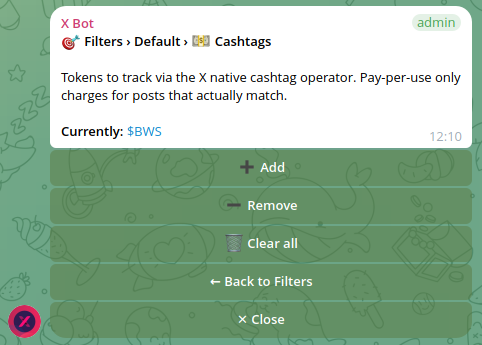
When you tap ➕ Add, the menu transitions into input mode — type your reply as a normal message, and the screen redraws automatically with a confirmation banner ("✓ Added 2 cashtags: $BTC, $ETH").
➕ Add cashtags

Send the cashtags to track, space-separated.
The $ is optional.

Example:  $BTC $ETH SOL

Type your reply as a normal message,
or tap Cancel to go back.

[✕ Cancel]
⏰ Schedule
When the bot runs and posts the daily report.
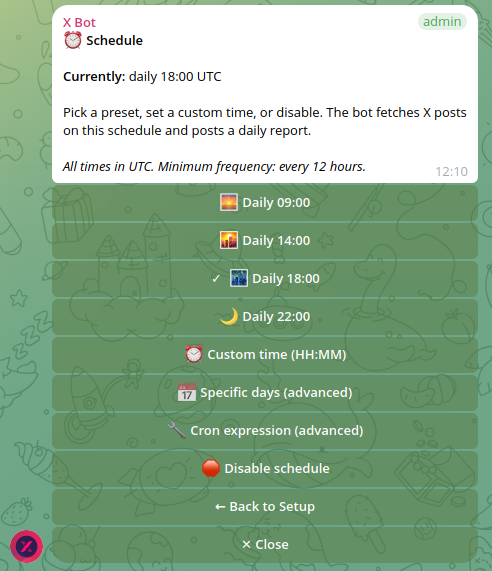
Four daily presets cover most communities. The currently-active preset gets a ✓ prefix in its label. Custom time asks for HH:MM. Specific days accepts 14:30 Mon Wed Fri. Cron accepts standard cron expressions (e.g. cron(0 12 ? * MON-FRI *)). The bot enforces a 12-hour minimum frequency to keep costs predictable.
If you tap a schedule preset on a chat with no filters, the menu refuses with a friendly error pointing back at 🎯 Filters — the bot won't schedule a chat that has nothing to fetch.
📊 Reports & Period
📊 Reports & Period

Period: 01/05/2026 7days
Start:  2026-05-01
End:    2026-05-07

The bot fetches X posts inside this window on
every scheduled run. Without a period
configured, the bot uses a rolling 24-hour
window.

[📆 Set period]   [🗑 Clear period]
[⚡ Generate report now]
[📰 Show last report]
Set period scopes reports to a specific window (e.g. a competition lasting one week). Format DD/MM/YYYY Ndays or Nweeks. Clear period reverts to the default rolling 24h. Generate report now triggers the same Step Function the cron uses — useful for instant previews. Show last report points at /report (which re-posts the most recent cached image at zero credit cost).
🎨 Customization
Project metadata that appears on reports and the public leaderboard.
🎨 Customization

🏷 Name:        MyToken
✏️ Description: A community-driven DeFi project
📝 Long desc.:  (multi-paragraph project pitch…)
🖼 Logo:        ✓ uploaded
🔗 URLs:        2 URLs
💬 Topic:       Forum topic "Reports"

[🏷 Name]      [✏️ Description]
[📝 Long desc.][🖼 Logo]
[🔗 URLs]      [💬 Topic]
[📈 Leaderboard customization]
The Leaderboard sub-tree exposes:
| Setting | Format |
|---|---|
| 🏆 Points | Five numbers, space-separated: likes retweets replies quotes views (e.g. 5 1 20 10 0.01) |
| 🎨 Colors | Five hex colors, same order |
| 🔢 Top count | Whole number 1..10 — how many users on the leaderboard |
| 📛 Top title | Free text. Optional |#hex suffix sets a custom color (e.g. Top contributors|#FF8800) |
| 🥇 Best-tweet title | Same |
| 📊 Engagement title | Same |
Logo uploads use the bot's existing photo handler — tap 🖼 Logo, then send the image as a Telegram photo (not a file). The bot resizes and uploads to the website CDN.
Topic instructs you to send /set_topic from inside the desired forum topic. The menu can't capture message_thread_id from a callback button, so this remains a slash-command surface.
👥 Admins & Notifications
Lists chats users designated to receive private DMs about credit exhaustion, fetch errors, and chat-not-found warnings. Adding admins still requires /add_admin @user1 @user2 from the chat — Telegram's @-mention parser only fires on real messages, not callbacks.
👥 Admins & Notifications

Currently:
  • Alice (@alice_admin)
  • Bob (@bob_dev)

To add admins, send /add_admin @user1 @user2
in this chat.

[🗑 Clear notification list]
💳 Buy Credits & Plan
Plan + balance display, plus the buttons that drive the buy and manage flows. The screen renders differently depending on the chat's current plan:
FREE chat:
💳 Buy Credits & Plan

Plan: FREE
Used this month: 47 / 100
Remaining:        53
Resets: 2026-06-01

[💰 Buy credits / upgrade]   [🛠 Manage subscription]
[📊 Usage this month]
PRO subscription chat:
💳 Buy Credits & Plan

Plan: PRO (subscription) ✓
Unlimited fetching with Stripe metering above 1 000 / month free.

[💰 Buy credits / upgrade]   [🛠 Manage subscription]
[📊 Usage this month]
PRO credits chat (ETH-purchased):
💳 Buy Credits & Plan

Plan: PRO (credits)
Credits remaining: 4 152
Total purchased:   5 000

[💰 Buy credits / upgrade]   [🛠 Manage subscription]
[📊 Usage this month]
The 💰 Buy credits / upgrade button posts a payment-options card below the menu. The options the bot offers depend on the current plan:
- FREE → both 💳 Pay with Credit Card (Stripe subscription) and 🪙 Pay with ETH (credit pack).
- PRO credits → both options shown. ETH tops up the existing balance; Stripe layers a subscription on top (existing ETH credits stay and are spent first per fetch).
- PRO subscription → no buy options. The bot replies with a "subscription exists" message and points at 🛠 Manage to go to the Stripe portal.
The 🛠 Manage subscription button opens the Stripe Customer Portal in your browser — that's where you update your card, cancel, or download invoices. Only meaningful when you have an active Stripe subscription.
The 📊 Usage this month sub-screen breaks out fetched_posts and fetch_attempts for the current month and today — useful for spotting silent failures (high attempts, zero posts → likely 402s or empty queries) and for previewing your next Stripe invoice when you're approaching the 1 000-post threshold.
Buy + manage are also reachable as the legacy slash commands
/buyand/subscription. Behaviour is identical; the menu buttons just save you typing.
📡 X Posts Auto-relay
Forwards posts from selected X accounts to the chat as soon as they're published — separate from the scheduled report. Useful when a project wants community admins to see official-account tweets in real time without checking X.
📡 X Posts Auto-relay

Forward posts from X accounts to this chat as soon
as they're published. Posts can take up to 5
minutes to appear here after the original was
posted on X.

3 active relays:
▶️ @MyTokenOfficial    (4/10 today)
▶️ @MyTokenCEO         (1/10 today)
⏸ @MyTokenSupport     (0/10 today)

[ ▶️ @MyTokenOfficial ]
[ ▶️ @MyTokenCEO ]
[ ⏸ @MyTokenSupport ]
[ ➕ Add Account ]
Each relay polls every 5 minutes via the X API. New posts (since the last successful forward) are pushed into the chat as plain URLs — Telegram auto-renders the X preview card so the post body is visible.
Per-relay manage screen lets the operator tune behaviour:
📡 X Posts Auto-relay › @MyTokenOfficial

State: ▶️ Active
Today: 4/10 forwarded
Polls every: 5 min

Post types to forward
☐ Retweets
☐ Replies (to other users)
✅ Quote tweets
✅ Thread continuations (self-replies)

Topic: (default — top of chat)

[ ⏸ Pause ] [ ✏️ Cap: 10/day ]
[ ☐ Retweets ] [ ☐ Replies ]
[ ✅ Quote tweets ] [ ✅ Thread ]
[ 💬 Set topic ] [ 🧹 Clear topic ]
[ 🗑 Delete relay ]| Setting | What it does |
|---|---|
| Cap (1–100/day) | Maximum forwards per chat per UTC day — when reached, the relay stops forwarding silently until midnight UTC. Default 10. |
| Pause / Resume | Disables the polling schedule for this relay; restoring re-creates it instantly. |
| Retweets | When ✅, retweets by the relayed account are forwarded. Default off. |
| Replies | When ✅, replies to other users are forwarded. Default off. |
| Quote tweets | When ✅, quote tweets are forwarded. Default on. |
| Thread continuations | When ✅, self-replies (a user replying to their own tweets) are forwarded — covers Twitter threads. Default on. Set this off if you only want the head of each thread. |
| Topic | Optional Telegram forum-topic id. When set, relay posts only to that topic instead of the main thread. |
Auto-cleanup: if Telegram returns a "chat-gone" error (bot was kicked / blocked), the relay automatically removes its polling schedule and stored configuration. No leak.
Hard limit: 10 relays per chat. Adjust the underlying constant if you need more.
ℹ️ About
ℹ️ About this chat

Chat ID: -1002593612414
Plan: PRO ✓
Schedule: daily 18:00 UTC
Project: MyToken
A diagnostics panel for support requests.
How /setup relates to slash commands
/setup is additive — every existing slash command keeps working exactly as before. The menu wraps the same primitives (buildQueryFromComponents, saveXBotSetting, createScheduleRule, etc.), so behaviour is identical between the two surfaces. Power users can keep typing /add_keywords DeFi airdrop for muscle-memory speed; newcomers get a friendly clickable surface.
Three commands fundamentally cannot be moved into menu buttons because they need plain-text + Telegram message-entity context that callbacks don't carry:
| Command | Why it stays |
|---|---|
/set_topic [name] | Captures the message_thread_id of the topic the message was sent in — a button has no thread context |
/add_admin @user | Relies on Telegram's verified mention entities for chat-admin verification |
/set_x_filtering | Legacy slash command for adding a named filter; the menu's ⤴ Named filters → ➕ Add named filter does the same |
Configuration recipes
Common goals → exact menu paths. Each recipe is one or two minutes of clicking.
"Track only original posts (no retweets, no replies)"
Most communities want the leaderboard to reward original content, not re-shares.
/setup → 🎯 Filters → 🚫 Excludes → tap Retweets and Replies so both show ✅. Done. Future fetches send -is:retweet -is:reply to the X API and quote tweets stay in.
"Reward replies more than likes (community building)"
Default points: likes 1×, retweets 2×, replies 1.5×, quotes 3×, views 0.001. To favour conversation:
/setup → 🎨 Customization → 📈 Leaderboard customization → 🏆 Points → send:
1 1 5 3 0.001Replies now weigh 5× — substantive discussion outpaces drive-by likes.
"Run reports twice a day"
Schedule fires at most once per day by default. To get an end-of-EU and end-of-US report:
/setup → ⏰ Schedule → 🔧 Cron expression → send:
cron(0 14,22 ? * * *)Two fires/day at 14:00 + 22:00 UTC. The 12-hour minimum frequency check enforces ≥ 12h spacing automatically — narrower windows are rejected with a clear error.
"Track multiple campaigns simultaneously in one group"
Three concurrent client campaigns, one Telegram group, one report per campaign per fire.
/setup → 🎯 Filters → ⤴ Named filters → ➕ Add named filter, then send one of these on each pass:
campaign_a from:@kol1,@kol2 keywords:"#CampaignALaunch"
campaign_b from:@kol3,@kol4,@kol5 cashtags:$CBT
campaign_c from:@kol6 mention:@CampaignC_Official
Each fires on the same schedule and posts a separate report tagged with the filter name.
"Forward an account's tweets in real time, between reports"
Big news from
@MyTokenOfficialshouldn't wait for the 22:00 UTC report.
/setup → 📡 X Posts Auto-relay → ➕ Add Account → send:
@MyTokenOfficial 5(Optional 5 is the daily cap; default 10.) The bot polls every 5 minutes, forwards the URL on a fresh post, Telegram renders the preview card.
"Constrain reports to a campaign window (e.g. 7-day push)"
Don't want pre-campaign noise contaminating the leaderboard.
/setup → 📊 Reports → 📆 Set period → send:
01/05/2026 7daysReports now fetch posts strictly inside that window. 🗑 Clear period reverts to rolling 24 h.
"Make reports post to a forum topic, not the main thread"
Group uses topics; reports should land in a dedicated Reports topic.
Open the Reports topic, then from inside it send:
/set_topic ReportsFuture reports route to that topic. To revert: /set_topic clear from anywhere in the group.
"Notify two specific admins when credits run out"
Bot DMs designated admins on credit / fetch / chat-gone errors. By default, it falls back to all chat admins — narrow to a curated list.
/add_admin @alice @bobDMs now go only to @alice and @bob. To clear: /setup → 👥 Admins → 🗑 Clear notification list.
"Hide the chat from the public xbot.ninja showcase"
Solo-KOL portfolios are auto-hidden (single user fails the ≥ 2 active users threshold). For community projects that should stay private:
There's no explicit hide toggle — public listing is gated by metric thresholds. Two ways to stay private:
- Run a small / quiet chat that doesn't meet the thresholds (top user score < 300, posts < 5/month, or active users < 2).
- Contact support to set the chat as exempt — the public dashboard skips it regardless of metrics.
The chat's direct URL (https://xbot.ninja/?chatId=…) remains accessible regardless. Share it only with people who should see the data.
Common gotchas
| Symptom | Reason | Fix |
|---|---|---|
Schedule "rejected" with FREQUENCY_ERROR | Cron tries to fire more often than every 12 h | Spacing check — pick at least 12-hour gaps. The error message names the offending hour pair. |
/setup doesn't appear in autocomplete | BotFather command list out of date | The bot accepts /setup regardless of autocomplete. Update BotFather → /setcommands if discoverability matters. |
| Filter preview shows empty parens / weird query | Some component is empty | /setup → 🎯 Filters shows the literal query. Add at least one of accounts / cashtags / keywords / mentions. |
| X Posts Auto-relay forwards a thread's worth of posts at once | Self-replies bypass X API's exclude=replies | /setup → 📡 X Posts Auto-relay → @account → toggle ☐ Thread continuations off. The bot then keeps only the thread head. |
| Daily cap reached but I want more | Hit MAX_POSTS_PER_DAY for relay | Tap ✏️ Cap and raise. Each post forwarded counts as one credit. |
| Custom title / color reverted overnight | Settings update worked but UPDATED_AT bump invalidated render cache; next fetch shows the new value | Wait one report cycle. The render cache rebuilds on the next fetch. |
| Report has "0 posts" everywhere | No posts matched the filter in the configured period | Drop the period (rolling 24 h is more forgiving), or widen filters. Often it's a typo in a cashtag. |
| Bot "online" but reports stop arriving | Bot was demoted from admin / kicked silently | Check Telegram → group admins. Re-promote if missing. The bot self-disables on chat-gone errors. |
Done
The wizard's final screen recaps everything that was saved and points at /setup → 📊 Reports → ⚡ Generate report now for an immediate preview:
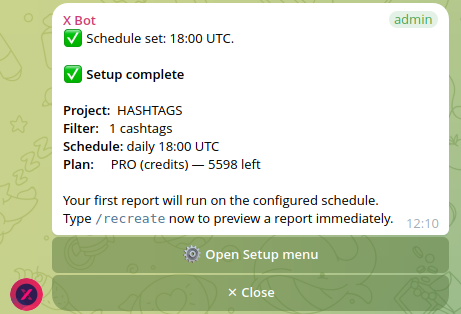
That's the whole tour. Type /setup in your group to start.
Hit an issue configuring a menu item? See Troubleshooting for symptom-to-fix matrices covering filters, schedules, and billing.
New to X Bot? Start with Installation to get the bot added and your first report running before working through this menu reference.