X Bot Overview: Telegram X Analytics for Crypto Teams
X Bot is a Telegram-native analytics platform that tracks X (Twitter) activity for crypto communities using the official X API. It's built specifically because most third-party trackers show large discrepancies in their metrics — every number X Bot reports comes directly from X.
Tagline: X analytics you can trust.
Quickest path
Add the bot to your group, type /setup, tap 🚀 Quick Start, follow four prompts. You'll have a live daily-report schedule in under two minutes — no slash commands to memorise. See The /setup menu for the full tour.
X Bot is free to start — see Pricing for the FREE tier, Stripe subscription, and ETH credit-pack options once you outgrow it.
Choose your use case
| Audience | What X Bot does | Where the value lands |
|---|---|---|
| Crypto projects | Measure community engagement and KOL ROI; run leaderboard competitions | Daily report in your community group + public showcase URL |
| KOL agencies | Verifiable performance reports per hired influencer or campaign | Daily report in the agency-internal group; share-with-client URL |
| Solo KOLs | Build a verifiable performance portfolio for client work | Public dashboard URL, shareable with prospective clients |
| Investors / DD analysts | Discover projects with authentic community traction | Browse xbot.ninja showcase, filter by metric |
Every section referenced above — Filters, Schedule, Reports, Customization, Admins, Buy Credits, and X Posts Auto-relay — is documented screen-by-screen in The /setup menu.
Use cases
Four scenarios that cover ~90% of how teams deploy X Bot. Each section walks through the operator's mental model, the exact /setup flow, what the daily report looks like, and what tangible outcome to expect.
🎯 1. KOL agency tracking 5 hired influencers in a campaign
Scenario — your agency was hired by MyToken to run a 30-day awareness campaign with 5 KOLs (@KOL_alpha, @KOL_beta, …). Each KOL signed a contract committing to N posts/week with the $MYTOKEN cashtag and a campaign hashtag #MyTokenLaunch. You need a verifiable daily leaderboard of who's actually delivering, fed into a private Telegram group the client can audit but only your team can configure.
Setup
Create a private Telegram group, name it "MyToken Q2 KOL Campaign". Invite the client as a read-only member, your team as admins.
Add
@BWS_X_Botand promote it to admin.In the group, type
/setup→ 🚀 Quick Start: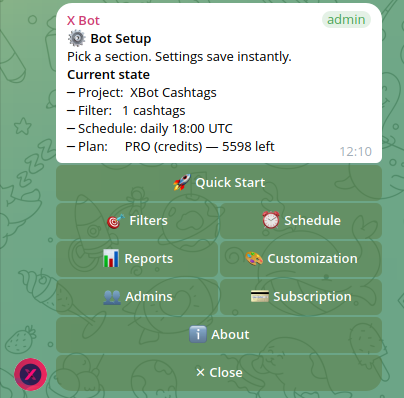
Step 1 — project name:
MyToken Q2 KOL CampaignStep 2 — what to track: pick 📢 Accounts, send the 5 handles space-separated:
@KOL_alpha @KOL_beta @KOL_gamma @KOL_delta @KOL_epsilonStep 3 — schedule: pick 22:00 UTC so the report ships at end-of-business-day for most US time zones.
(After wizard) — open
/setup→ 🎯 Filters → add the campaign cashtag and hashtag so posts only count when on-topic: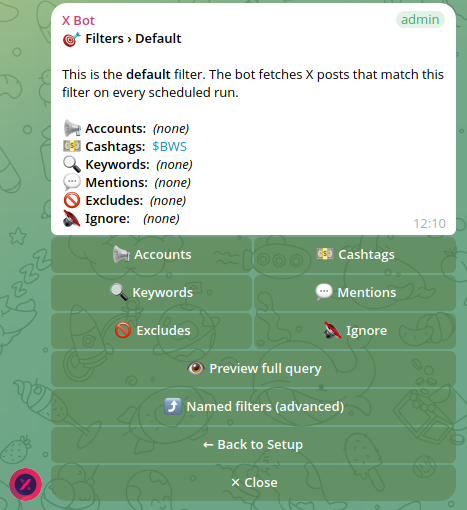
- Cashtags:
$MYTOKEN - Keywords:
"#MyTokenLaunch"
The bot now requires a post to be (by one of the 5 KOLs) AND ($MYTOKEN OR #MyTokenLaunch) before counting it.
- Cashtags:
Sample report — real production output from a chat tracking a small KOL group:
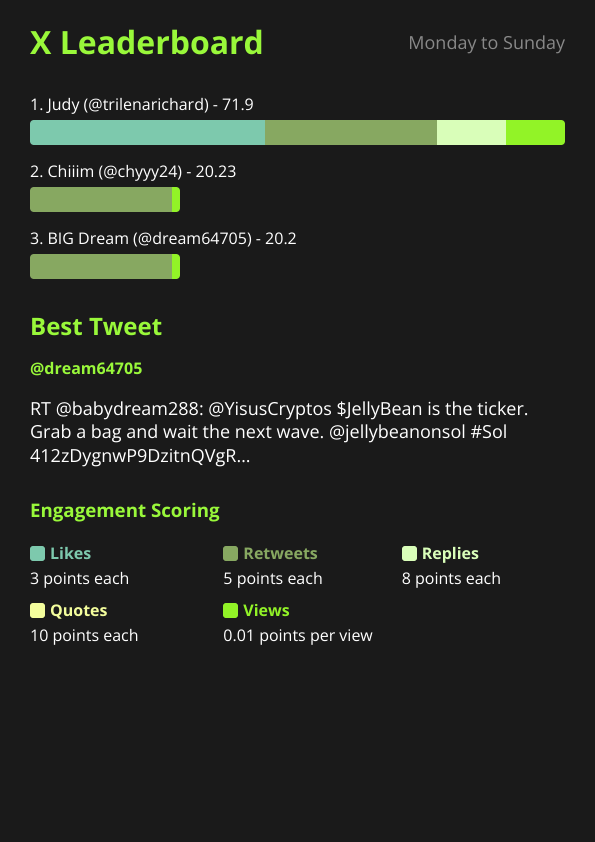
The leaderboard surfaces who delivered (Judy at 71.9 pts, leading by 3.5×). The Best Tweet panel highlights a real on-topic retweet to demonstrate which content drove the score. Engagement Scoring footer makes the formula transparent for the client.
Outcome
- The client receives an audit trail showing exactly which KOLs delivered.
@KOL_epsilon's zero rows surface contract-compliance issues immediately.- After 30 days, the public URL
https://xbot.ninja/?chatId=…summarises the whole campaign for the client deliverable.
🌱 2. Crypto project engaging community to post about $TOKEN
Scenario — MyToken is launching a feature and wants the community to amplify. You set a small leaderboard prize for the top 3 community posters this week. Anyone who tweets $MYTOKEN or uses #MyTokenAirdrop gets ranked.
Setup
Use the project's existing community Telegram group (or create one).
Add
@BWS_X_Bot, promote to admin./setup→ 🚀 Quick Start: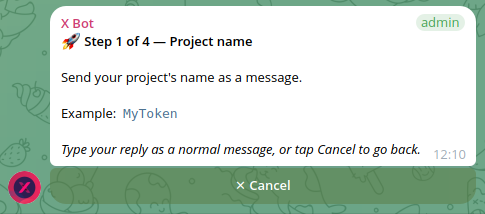
Project name:
MyTokenWhat to track — pick 💵 Cashtags:
$MYTOKEN…then come back later and add 🔍 Keywords:
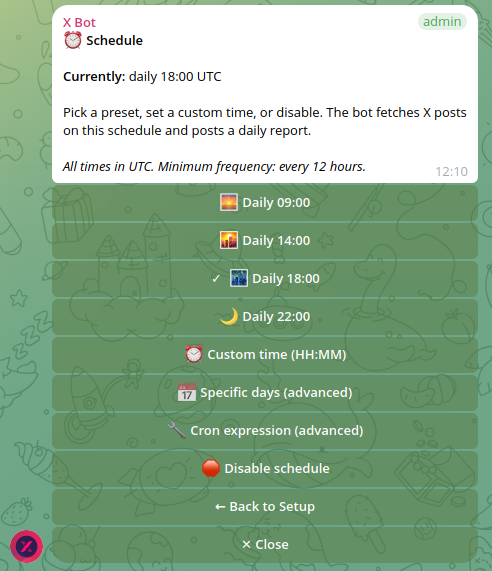
"#MyTokenAirdrop"Schedule: 14:00 UTC works for most communities (covers EU evening + US morning):
Optional:
/setup→ 🎨 Customization → set logo + URLs so the public xbot.ninja page is brand-ready.
Sample report — real production output from a community-tracking chat with 10+ active posters:
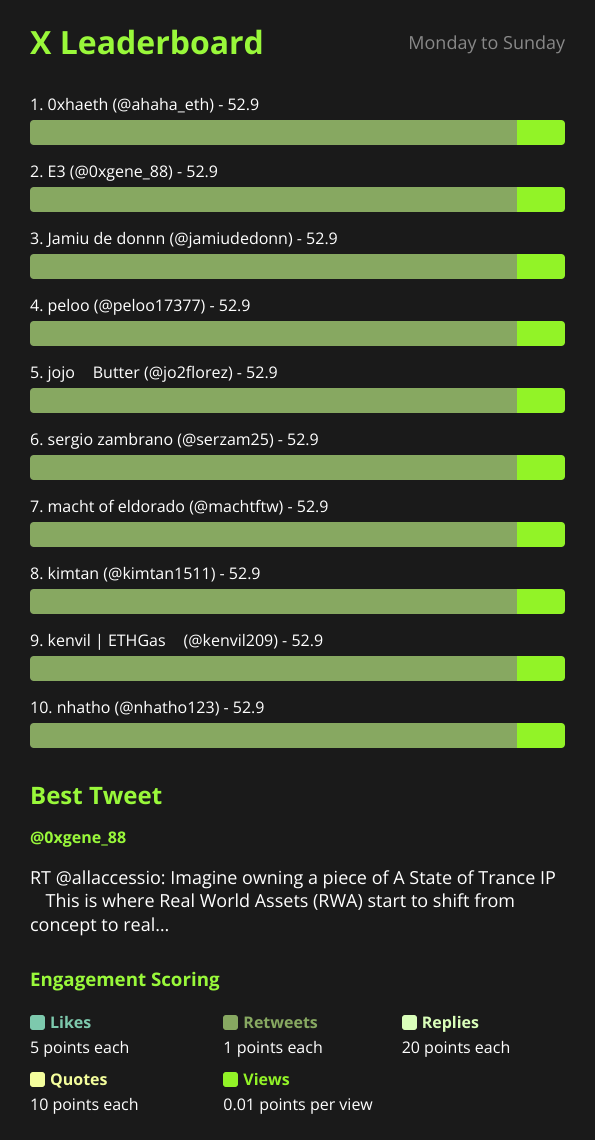
A weekly Monday-to-Sunday view: 10 users ranked, all with comparable engagement (community cadence rather than agency-style differentiation). Every chat customises the weight of each engagement type — this one rewards replies heavily (20 pts/reply), which encourages thread-starting over drive-by likes.
Outcome
- Leaderboard creates a cheap engagement loop — people post for ranking + bragging rights, no token rewards needed.
- Public URL (xbot.ninja) doubles as a marketing surface — investors and ecosystem partners can see real activity at a glance.
- Public listing kicks in once thresholds are met (≥ 300 top score, ≥ 5 posts, ≥ 2 active users in the current month).
🎤 3. Solo KOL building a verifiable performance portfolio
Scenario — you're an independent KOL pitching a six-figure quarterly contract. Your prospect asks for proof of past performance. Screenshots are easy to fake; you want a continuously-updating, third-party-verifiable dashboard.
Setup
Create a private Telegram group named after your handle (e.g. "@your_username Performance").
Add
@BWS_X_Bot, promote to admin./setup→ 🚀 Quick Start:- Project name:
@your_username Performance Portfolio - What to track → 📢 Accounts →
@your_username - Schedule → 09:00 UTC
- Project name:
/setup→ 🎨 Customization → upload your headshot as logo, add your LinkedIn / website / press-kit URLs.Bookmark
https://xbot.ninja/?chatId=<your-chat-id>(visible in/setup→ ℹ️ About).
Sample report — real production output from a single-account portfolio chat:
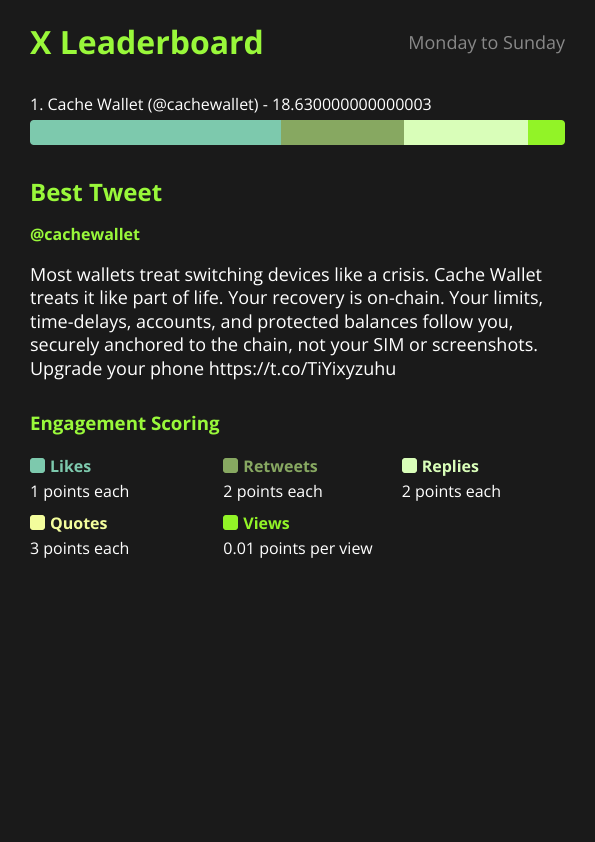
One account on the leaderboard, but with a real Best Tweet showcasing the actual content. Investor-facing surface — the prospect sees a continuously-updating dashboard, not a screenshot.
Outcome
- Send the public URL to prospects in your pitch. Real-time. Cannot be faked. Pulls direct from X API.
- Drop the URL into your X bio / link-in-bio for ambient credibility.
- Past 30/90/365-day rollups are accessible in the same page — long arcs, not just "last week".
🏢 4. Multi-client agency: Named filters in one chat
Scenario — your agency runs three concurrent campaigns (Client A, Client B, Client C). One Telegram group holds all of them; you want one report-per-client posted daily, not one mega-report.
Setup
Group is already set up with X Bot installed.
/setup→ 🎯 Filters → ⤴ Named filters → ➕ Add named filter, then send one definition per filter:client_a from:@kol1,@kol2 keywords:"#ClientALaunch" client_b from:@kol3,@kol4,@kol5 cashtags:$CBT client_c from:@kol6,@kol7 mention:@ClientC_Official/setup→ 🎯 Filters → Named filters to verify:Schedule fires once per day; the bot loops over every named filter and posts a separate report per filter in the same group, each tagged with the filter name in the title.
Outcome
- One Telegram group, three logical reports.
- Each report has its own leaderboard, best-tweet selection, and stats.
- Per-client invoicing reflects exact post counts pulled from the agency's own dashboard.
- Adding a new client is one slash command, no new group required.
Tip — you can also do this with separate groups (cleaner client confidentiality, no cross-visibility). Named filters are best when you see all clients but each client only sees their own metrics via their dedicated public URL.
Performance scoring
Each X post gets a numerical score based on its engagement. The default formula:
Score = 10 + (likes × 3) + (retweets × 5) + (replies × 8)
          + (quotes × 10) + (impressions × 0.01)
+10 base score per post is added for every tracked post — rewards consistent posting even if a tweet doesn't go viral.
Default multipliers (configurable per chat via /setup → 🎨 Customization → 📈 Leaderboard customization → 🏆 Points):
| Metric | Default weight | Configurable? |
|---|---|---|
| Likes | × 3 | ✅ |
| Retweets | × 5 | ✅ |
| Replies | × 8 | ✅ |
| Quotes | × 10 | ✅ |
| Impressions ("views") | × 0.01 | ✅ |
A user's total performance score for a period is the sum of all their tracked-post scores in that period. Scores are stored at three granularities (daily / monthly / yearly) so historical lookups are O(1).
When to tune the multipliers
- Raise retweets if the goal is reach (campaigns).
- Raise replies if the goal is engagement quality (community building).
- Raise quotes if the goal is original commentary (thought-leadership campaigns).
- Lower impressions if you don't trust the figures on a particular niche (very small accounts).
Public listing thresholds
For a project to appear in the public showcase on xbot.ninja and contribute to global leaderboards, it must satisfy all three rules during the current month:
| Threshold | Default value | Why |
|---|---|---|
| Top user score | ≥ 300 | Filters out inactive single-poster setups |
| Tracked posts | ≥ 5 | Filters out test groups and zero-engagement chats |
| Active users | ≥ 2 | Filters out solo-account portfolios from the community showcase (solo KOLs still get their direct URL) |
Projects below any threshold remain accessible at their direct URL https://xbot.ninja/?chatId=… but are hidden from the showcase and excluded from global leaderboards. Solo-KOL portfolios (Use case 3 above) typically land here — that's by design; the public showcase is for community projects.
What X Bot does not do
- It doesn't post on your behalf — read-only X API usage. The bot reads, never writes.
- It doesn't store post bodies long-term — posts are aggregated into rolled-up scores and a daily report image; raw post content is held in cache for fetch deduplication only.
- It doesn't replace a CRM — engagement metrics, not user PII.
- It doesn't track DMs / private accounts — only public X content visible to anyone.
How it works at a glance
Telegram group → /setup menu → settings + filters saved
                                       ↓
                     scheduled cron (per-chat schedule)
                                       ↓
                     fetch → cache → score → render report image
                                       ↓
                              send to Telegram chat
                                       ↓
              Stored: daily/monthly/yearly aggregate scores
                                       ↓
              Public dashboard at xbot.ninja (if thresholds met)
Cost model: FREE chats get 100 posts/month. Heavier usage picks one of two paths — Stripe subscription ($19/month + $0.02/post above 1 000 included) or ETH credit pack ($0.02/credit, never expires). The two layer cleanly (ETH credits drain first per fetch, then the subscription's monthly grant, then metered overage). Full details in Pricing.
Where to go next
- Installation — add X Bot to your Telegram group in three steps
- The /setup menu — full walkthrough of every configuration screen
- Support — get help