Auto-Relay X Posts to Telegram in Real Time
Forward posts from selected X accounts into your Telegram chat within minutes of publication. Set daily caps so a viral spike does not flood the chat.
 by Nacho Coll
Nacho leads the Blockchain Web Services (BWS) team that builds and operates X Bot — the Telegram bot that turns X (Twitter) activity into leaderboards for crypto communities.
When you’re managing a crypto community or tracking KOL performance, waiting hours to discover important posts isn’t an option. Whether it’s your hired influencers dropping alpha, your project’s CEO announcing partnerships, or competitor movements you need to monitor, every minute counts in crypto.
Most teams resort to manually refreshing X profiles or setting up crude notification systems. But there’s a better way: X Bot’s auto-relay feature forwards posts from selected accounts directly into your Telegram chat within minutes of publication.
Why Auto-Relay Beats Manual Monitoring#
Picture this scenario: You’re running a token launch campaign with five KOLs. Each influencer posts 3-5 times daily about your project, but you’re also tracking their general activity to ensure brand alignment. Without automation, someone on your team needs to:
- Check each KOL’s profile every few hours
- Screenshot important posts for internal review
- Manually forward relevant content to stakeholder chats
- Track engagement metrics separately
This approach breaks down quickly. Posts get missed during off-hours, team members forget to check certain accounts, and by the time you see a viral post, the engagement window has already peaked.
X Bot’s auto-relay solves this by creating a live feed of selected accounts directly in your Telegram group. No more manual polling, no missed posts, no delays.
Setting Up Auto-Relay in X Bot#
The auto-relay feature lives within X Bot’s comprehensive /setup menu system. Here’s how to configure it:
Step 1: Access the Auto-Relay Menu#
After adding @BWS_X_Bot to your Telegram group and promoting it to admin, run /setup to open the main configuration menu.
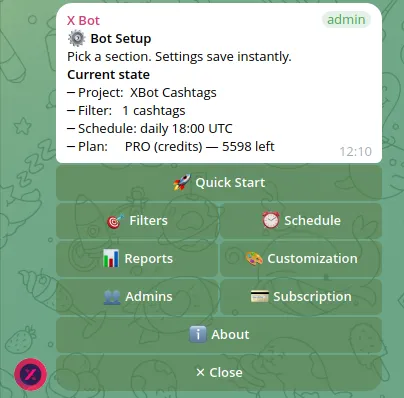
Navigate to 📡 X Posts Auto-relay from the main menu. This opens the auto-relay management interface where you can add accounts, configure daily limits, and toggle content types.
Step 2: Add Target Accounts#
Click ➕ Add Account and enter the X username you want to track. You can add multiple accounts—useful for KOL agencies tracking numerous influencers or projects monitoring both their own accounts and competitor activity.
For each account, you’ll configure:
Daily Cap (Default: 10 posts) This prevents a single viral account from flooding your chat. If a tracked influencer goes viral and posts 50 times in one day, only the first 10 will forward to Telegram. The cap resets at midnight UTC.
Content Type Filters Toggle forwarding for:
- Original posts: Standard tweets and threads
- Retweets: When the account shares others’ content
- Replies: Responses to other users
- Quotes: Quote tweets with added commentary
- Thread continuations: Follow-up tweets in a thread
Most teams disable retweets and replies to focus on original content, but the flexibility exists for comprehensive monitoring scenarios.
Step 3: Fine-Tune Your Configuration#
The beauty of X Bot’s auto-relay lies in its granular controls. Unlike RSS feeds that dump everything or X notifications that bury important content, you can create precisely the information flow your team needs.
For example, a KOL agency might configure:
- Influencer accounts: 10 posts/day, original content only
- CEO accounts: 25 posts/day, including retweets and quotes
- Competitor accounts: 5 posts/day, original content only
This ensures your chat receives relevant updates without becoming unmanageable.
Understanding Auto-Relay Latency and Reliability#
X Bot’s auto-relay typically delivers posts within 5 minutes of publication. This near-real-time performance comes from dedicated infrastructure that monitors X’s data streams continuously, rather than periodic polling that might miss content or hit rate limits.
The ~5-minute latency exists because:
- X’s own systems have propagation delays
- X Bot batches requests to ensure reliability
- Content filtering and formatting adds processing time
For crypto communities where sentiment can shift in minutes, this latency strikes the right balance between speed and system stability. It’s fast enough to catch breaking news and viral moments, but reliable enough to handle high-volume accounts without service interruptions.
Cost Structure and Budget Protection#
Auto-relay forwards count against your X Bot credit balance—each forwarded post debits one credit from your account. This usage-based model ensures you only pay for the content you actually receive.
The daily cap system serves dual purposes: preventing chat floods and protecting your budget. Without caps, a viral account could consume hundreds of credits in a single day. With the default 10-post limit, your maximum daily spend per account is predictable and controllable.
X Bot’s pricing layers work seamlessly with auto-relay:
- FREE plan: 100 posts/month total (tracking + auto-relay combined)
- PRO subscription: $19/month including 1,000 posts, then $0.02 per additional post
- ETH credit packs: $0.02 per credit, available in packs from 1,000 to 100,000
Credits never expire and drain before subscription allocations, giving you maximum flexibility in managing costs across multiple use cases.
Auto-Relay vs. Building Your Own Solution#
Many technical teams consider building custom X-to-Telegram bridges using X’s API and Telegram bot frameworks. While possible, this approach involves significant complexity:
X API Costs and Complexity X’s API pricing starts at $100/month for basic access, with additional costs for higher-volume monitoring. You’ll also need to handle rate limiting, webhook management, and API key security.
Infrastructure Requirements A reliable solution needs:
- Persistent server hosting
- Database storage for tracking processed posts
- Queue systems for handling burst traffic
- Monitoring and alerting for downtime
- Regular maintenance and updates
Development and Maintenance Time Building a production-ready system typically requires:
- 2-3 weeks initial development
- Ongoing maintenance for API changes
- Debugging edge cases and rate limits
- Scaling infrastructure as monitoring needs grow
For most crypto teams, these costs far exceed X Bot’s usage-based pricing, especially when factoring in developer time and infrastructure management.
Real-World Use Cases for Auto-Relay#
KOL Agency Multi-Client Monitoring A KOL agency managing 20 influencers across 5 client projects creates separate Telegram chats for each client. Each chat auto-relays only the relevant influencers’ posts, giving clients real-time visibility into their hired talent’s activity without exposing other clients’ campaigns.
Token Launch Coordination During a token launch, the core team needs immediate visibility when partner accounts or major holders post about the project. Auto-relay feeds these posts directly into the coordination chat, enabling rapid response to both positive momentum and potential issues.
Competitive Intelligence Projects often monitor competitor announcements, partnership reveals, and community sentiment. Auto-relay creates a dedicated feed of competitor account activity, helping teams stay informed about market movements without manually stalking profiles.
Solo KOL Portfolio Management Individual influencers use auto-relay to monitor their own posting patterns and engagement timing. By forwarding their posts to a private chat, they can track which content types and posting times generate the strongest community response.
Combining Auto-Relay with Leaderboard Tracking#
Auto-relay works alongside X Bot’s core leaderboard functionality, creating a comprehensive community management system. You might track broader community activity with cashtag filters while auto-relaying specific high-value accounts for immediate attention.
For example, a project might:
- Track all posts mentioning
$TOKENfor weekly leaderboards - Auto-relay posts from the top 10 holders for immediate visibility
- Auto-relay competitor announcements for strategic awareness
This combined approach provides both analytical insights and real-time operational intelligence. Learn more about setting up comprehensive tracking in our token launch tracking guide. And when you want a one-off check outside the relay flow, you can pull the latest leaderboard with /report (see how the on-demand report command works) instead of waiting for the next scheduled report.
Best Practices for Auto-Relay Configuration#
Start Conservative with Daily Caps Begin with lower daily limits (5-10 posts per account) and increase based on actual posting patterns. It’s easier to raise limits than to deal with chat floods.
Segment by Account Type Different account types warrant different configurations:
- Project accounts: Higher limits, include retweets for announcement amplification
- KOL accounts: Medium limits, original content focus
- Competitor accounts: Lower limits, strategic monitoring only
Use Multiple Chats for Different Purposes Don’t mix operational feeds with analytical tracking. Create separate chats for:
- Immediate-action auto-relay feeds
- Weekly/daily leaderboard reports
- Long-term community analytics
Monitor Credit Usage Auto-relay can consume credits quickly with high-volume accounts. Check your usage periodically through the /setup → 💳 Buy Credits menu to avoid service interruptions.
Getting Started with Auto-Relay#
Setting up auto-relay takes just a few minutes, but the operational benefits compound over time. Start by identifying your 3-5 most critical accounts to monitor—whether that’s hired influencers, project leadership, or key community voices.
The feature works particularly well alongside X Bot’s other capabilities. While auto-relay provides real-time operational intelligence, the leaderboard reports offer analytical insights into broader community engagement patterns. Together, they create a comprehensive picture of your project’s X presence.
For teams managing complex multi-account scenarios, consider reading our guide on KOL agency multi-client tracking for advanced configuration strategies.
Ready to track your community on X? Add @BWS_X_Bot to your Telegram group, run /setup, and your first report fires on the configured schedule. The FREE plan covers 100 posts/month — no card required.
About this article: This post was drafted with AI assistance using X Bot’s content workflow and reviewed by Nacho Coll, Founder & Principal at Blockchain Web Services (BWS), before publishing. Every product claim is checked against the live bot. Read how we use AI in our content. Spot an error? Reach us via
/setup→ ❓ Help & Support.
About the author
Nacho Coll
Founder & Principal, Blockchain Web Services
Nacho leads the Blockchain Web Services (BWS) team that builds and operates X Bot — the Telegram bot that turns X (Twitter) activity into leaderboards for crypto communities. He writes about KOL performance tracking, the X API, and running analytics bots for Telegram groups, from the operator side of the wire. Building on blockchain and decentralized infrastructure since 2019.
- x posts to telegram
- auto-relay twitter telegram
- telegram x integration
- twitter rss telegram bot