Tracking X Activity for a Token Launch: What KOLs Actually Posted
Track which KOLs posted about your token, score each post by engagement, and post the leaderboard in your Telegram group. Setup takes 5 minutes.
 by Nacho Coll
Nacho leads the Blockchain Web Services (BWS) team that builds and operates X Bot — the Telegram bot that turns X (Twitter) activity into leaderboards for crypto communities.
Running a token launch campaign means hiring KOLs, briefing them on your messaging, and then… hoping they actually post. Most coordinators end up manually checking each influencer’s X feed, trying to remember who posted what and when. It’s tedious work that pulls focus from launch prep, and you often miss posts or struggle to quantify which KOL delivered the most value.
There’s a better way. Instead of manual tracking, you can use a Telegram bot to automatically monitor KOL activity, score their posts by engagement metrics, and post ranked leaderboards directly into your campaign group. Your team sees real-time accountability, KOLs see their performance relative to peers, and you get clean data for future hiring decisions.
The Token Launch Tracking Problem#
Token launches involve multiple moving pieces: marketing materials, community coordination, press outreach, and influencer management. KOL campaigns typically work like this:
- Hire influencers with specific follower counts and engagement rates
- Brief them on key messages, hashtags, and your token’s cashtag
- Set posting quotas — maybe 3 posts over launch week
- Monitor compliance by manually checking their feeds
- Calculate payments based on what actually got posted
Step 4 is where most coordinators get stuck. Checking 10-20 KOL accounts daily means opening dozens of browser tabs, scrolling through timelines, and keeping mental notes of who posted when. You might miss a post, misattribute engagement numbers, or lose track of which influencer delivered the most bang for your buck.
This manual tracking also misses the community aspect. KOLs perform better when they see peer competition, but there’s no easy way to show them how their posting activity compares to other campaign participants.
How X Bot Solves KOL Tracking#
X Bot turns your campaign Telegram group into a live tracking dashboard. Add the bot, configure it to watch your hired KOLs plus your token’s cashtag, and it automatically fetches their posts on a schedule, scores them by engagement, and posts visual leaderboards back into the chat.
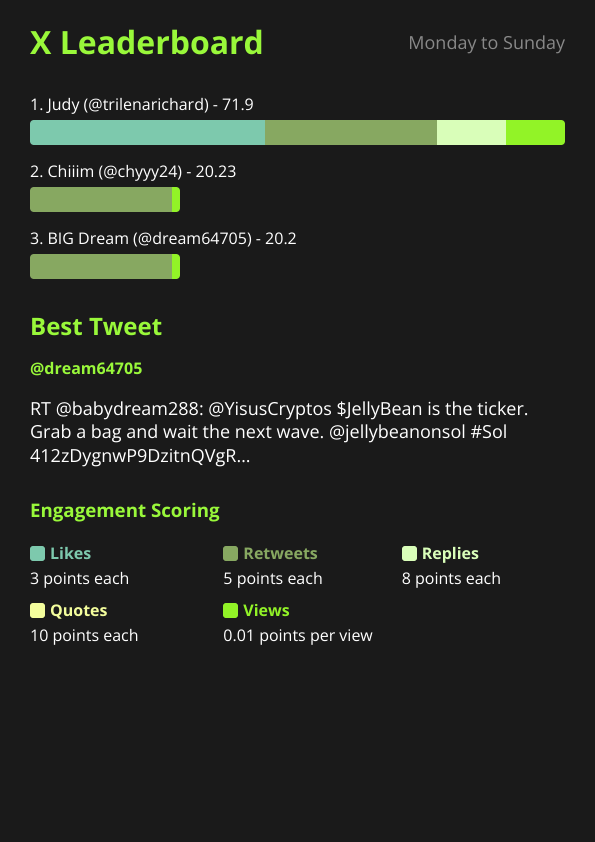
Here’s what that looks like in practice:
The bot tracks exactly what you need for launch accountability: which KOL posted when, how much engagement each post received, and who’s leading the campaign in total activity. Your team sees this data without leaving Telegram, and KOLs in the group get instant feedback on their performance.
Setting Up KOL Tracking in 5 Minutes#
Configuration happens through an interactive menu system that walks you through each option. Here’s the step-by-step process:
1. Add the Bot to Your Campaign Group#
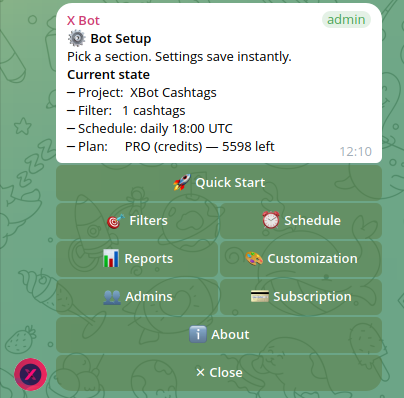
Start by adding @BWS_X_Bot to your campaign Telegram group and promoting it to admin status. The bot needs admin permissions to post leaderboard images and manage its scheduled reports.
2. Configure Filters for Your Campaign#
Run /setup to open the configuration menu, then navigate to 🎯 Filters. This is where you tell the bot which X activity to track.
For token launches, you’ll typically want two types of filters:
📢 Accounts filter: Add your hired KOLs’ X handles here. The bot will fetch all posts from these accounts, regardless of content. If you hired @cryptoinfluencer1, @defitrader, and @nftwhale, add all three handles.
💵 Cashtags filter: Add your token’s cashtag (like $YOURTOKEN). This catches posts from anyone mentioning your token, not just hired KOLs. Useful for tracking organic coverage or catching posts you might have missed.
For a deeper dive into cashtag-only tracking — numeric cashtag handling, filter combinations, and launch-week configurations — see our guide on tracking cashtags across X for crypto projects.
You can combine both approaches. The bot will fetch posts that match any of your configured filters — so you’ll see all posts from your hired KOLs plus any posts mentioning your cashtag, even from accounts you didn’t explicitly track.
3. Set Your Reporting Schedule#
Navigate to ⏰ Schedule in the setup menu. For active launch campaigns, daily reports work well — they give you fresh data each morning without overwhelming the chat.
The bot offers preset times (09:00, 14:00, 18:00, 22:00 UTC) or custom scheduling if your team operates in a specific timezone. Reports have a 12-hour minimum interval to prevent spam.
4. Customize the Report Branding#
Under 🎨 Customization, set your project name, upload a logo, and adjust the leaderboard colors to match your brand. This makes the reports feel like they belong to your campaign rather than looking like generic bot output.
You can also adjust scoring weights if you care more about certain engagement types. By default the bot weights conversation highest — a quote counts most, then a reply, then a retweet, with a plain like as the baseline and views barely moving the score — and you can adjust these multipliers via /setup → 🎨 Customization if you’d rather emphasize retweets for reach or replies for community engagement.
What You Get in Each Report#
X Bot’s leaderboard reports include several data points that matter for launch tracking:
Per-KOL scoring: Each tracked user gets a composite score based on their posting activity during the report period. The scoring uses configurable weights across likes, retweets, replies, quotes, and views.
Best tweet picker: The report highlights the single highest-performing post from the period, giving you insight into which messaging resonated best with audiences — see how the best tweet picker actually works for the full selection rule.
Activity timeline: You can see at a glance who posted recently versus who might be falling behind on their campaign commitments.
Engagement metrics: Raw numbers for each post type, so you can spot which KOLs are driving genuine interaction versus just posting into the void.
This data helps with both immediate campaign management and future planning. You can identify which influencers are worth rehiring, which messaging approaches work best, and whether your campaign is building momentum or stalling out.
Pricing for Campaign Tracking#
X Bot operates on a usage-based model that aligns well with time-bound campaigns. Instead of paying monthly whether you’re actively launching or not, you pay per post fetched from X.
For most token launch campaigns, ETH credit packs work better than the subscription model. You can buy exactly the credits you need for your campaign duration, and unused credits never expire.
Pricing is $0.02 per post fetched. If you’re tracking 10 KOLs who post 3 times each during your launch week, that’s 30 posts total, or $0.60 in credits. Even accounting for organic mentions your cashtag filter might catch, most week-long campaigns cost under $10 to track completely.
The FREE plan includes 100 posts per month, which covers smaller campaigns or testing the bot before committing to paid tracking.
Real Campaign Stories#
Multi-KOL accountability: A DeFi project hired 12 influencers for their token launch but struggled to track who was actually posting. After setting up X Bot, they discovered that 3 KOLs had barely posted at all, while 2 others were significantly outperforming their contracts. The leaderboards made this visible to the entire campaign team, leading to mid-campaign bonus payments for top performers and contract adjustments for underperformers.
Organic coverage tracking: A gaming token used both account and cashtag filters during their launch week. While their hired KOLs posted as contracted, the cashtag filter caught significant organic discussion from gaming communities they hadn’t directly targeted. This organic activity accounted for 40% of total tracked engagement, helping them identify new influencer prospects for future campaigns.
Competitive dynamics: An NFT project added their hired KOLs to the same Telegram group where reports were posted. The public leaderboards created friendly competition between influencers, with several KOLs increasing their posting frequency to climb the rankings. Total campaign posts increased 60% compared to the project’s previous launch.
When X Bot Isn’t the Right Tool#
X Bot works best for campaigns where you want transparency and team visibility into KOL performance. It’s not ideal for:
Stealth campaigns where you can’t have KOLs in the same group or don’t want visible performance comparisons.
Content quality tracking — the bot scores engagement but doesn’t evaluate whether posts follow your messaging guidelines or brand standards.
Cross-platform campaigns — if your KOLs are posting primarily on TikTok, Instagram, or other platforms, X Bot only captures their X activity.
Real-time crisis management — reports run on a schedule, so you won’t get instant alerts if a KOL posts problematic content.
For these scenarios, you might need complementary tools or manual oversight alongside automated tracking.
Advanced Campaign Configurations#
Once you’re comfortable with basic KOL tracking, X Bot offers several advanced features for complex launches:
Named filters: Run multiple tracking configurations in the same chat. You might have one filter for Tier 1 KOLs, another for Tier 2 influencers, and a third for community members. Each gets its own leaderboard section.
Auto-relay: Forward posts from your top KOLs directly into the campaign chat using the 📡 X Posts Auto-relay feature. This gives your team real-time visibility into campaign content without manually checking each account.
Public dashboards: If your campaign generates enough activity (top score >= 300, >= 5 tracked posts, >= 2 active users monthly), your leaderboards become publicly visible at https://xbot.ninja. This can serve as social proof during your launch phase.
Custom exclusions: Filter out retweets, quote tweets, or replies if you only want original content in your tracking. Useful for campaigns focused on original posting rather than amplification.
Getting Started with Your Launch Campaign#
The most effective approach is to set up X Bot early in your campaign planning process, before you brief your KOLs. This gives you baseline data and lets you test your filter configurations with a small group.
Start with account filters for your confirmed KOLs, add your token’s cashtag filter, and configure daily reports at a time that works for your team’s schedule. You can always adjust filters, timing, and customization as your campaign evolves.
If you’re weighing manual spreadsheet tracking against automation for your launch, our X Bot vs Manual Spreadsheet Tracking guide breaks down when each approach wins.
If you’re working with KOLs who prefer transparency, invite them to the tracking group so they can see the leaderboards. Many influencers appreciate having concrete engagement data rather than wondering how their performance compares to campaign expectations.
For larger agencies managing multiple simultaneous launches, see KOL Agency Multi-Client Tracking for how to run separate tracking groups or named filters to segment different client campaigns within shared operational groups.
If your launch team needs alerts the moment a partner account or major holder posts rather than waiting for the next leaderboard, you can also auto-relay their posts directly into your coordination chat.
The key is treating X Bot as part of your campaign infrastructure, not just a reporting tool. When KOL tracking becomes automatic, you can focus on the strategic work that actually drives launch success.
Ready to track your community on X? Add @BWS_X_Bot to your Telegram group, run /setup, and your first report fires on the configured schedule. The FREE plan covers 100 posts/month — no card required.
About this article: This post was drafted with AI assistance using X Bot’s content workflow and reviewed by Nacho Coll, Founder & Principal at Blockchain Web Services (BWS), before publishing. Every product claim is checked against the live bot. Read how we use AI in our content. Spot an error? Reach us via
/setup→ ❓ Help & Support.
Campaigns that sustain strong engagement can also qualify for the public X Bot leaderboard, turning your launch tracking into a public marketing asset.
About the author
Nacho Coll
Founder & Principal, Blockchain Web Services
Nacho leads the Blockchain Web Services (BWS) team that builds and operates X Bot — the Telegram bot that turns X (Twitter) activity into leaderboards for crypto communities. He writes about KOL performance tracking, the X API, and running analytics bots for Telegram groups, from the operator side of the wire. Building on blockchain and decentralized infrastructure since 2019.
- x activity token launch
- kol tracking telegram
- twitter analytics token
- crypto kol leaderboard