Tracking Cashtags ($YOURTOKEN) Across X for Crypto Projects
Configure X Bot to track every X post mentioning your project cashtag, score the activity, and post a leaderboard to your Telegram group. 3-minute setup.
 by Nacho Coll
Nacho leads the Blockchain Web Services (BWS) team that builds and operates X Bot — the Telegram bot that turns X (Twitter) activity into leaderboards for crypto communities.
When your crypto project launches, tracking community engagement around your token’s cashtag becomes crucial. Whether you’re managing a memecoin launch or coordinating KOL campaigns, you need visibility into who’s posting about $YOURTOKEN and how those posts perform.
X Bot automates this process by monitoring every post mentioning your project’s cashtag, scoring the engagement, and delivering visual leaderboards to your Telegram group. No more manual spreadsheet tracking or missing viral tweets about your token.
Why Track Cashtags Instead of Keywords?#
Cashtags like $BTC, $ETH, or $PEPE are crypto’s native language on X. Unlike generic keywords that catch irrelevant posts, cashtags provide precise signals:
- Intentional mentions: Users typing
$YOURTOKENare specifically discussing your project - Community adoption: Organic cashtag usage indicates growing awareness
- KOL compliance: Hired influencers can demonstrate they mentioned your token properly
- Viral tracking: Spot trending conversations around your cashtag in real-time
Most crypto communities naturally gravitate toward cashtag usage, making them ideal tracking targets.
Setting Up Cashtag Tracking: Step by Step#
1. Add X Bot to Your Telegram Group#
Start by adding @BWS_X_Bot to your project’s Telegram group. Promote the bot to admin — default admin rights are enough; the bot needs admin status so Telegram lets it read group messages and post the leaderboard image.
2. Open the Setup Menu#
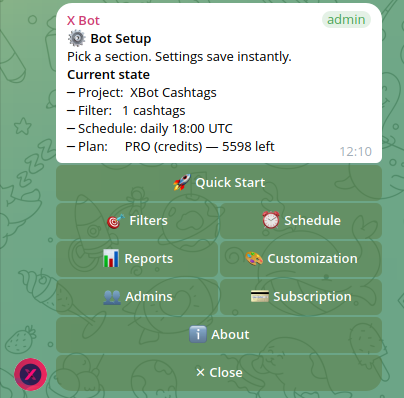
Run /setup to access X Bot’s configuration interface. You’ll see the main menu with options for filters, scheduling, reports, and customization.
3. Configure Cashtag Filters#
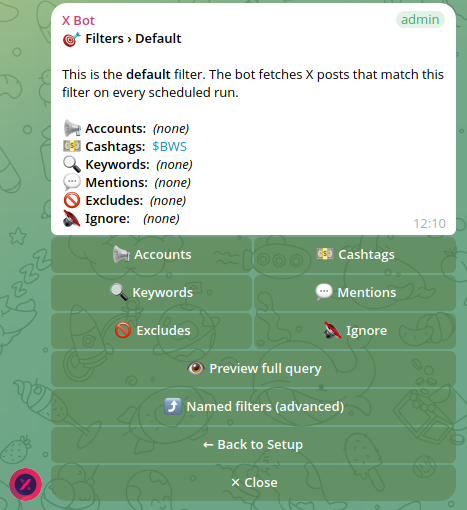
Tap 🎯 Filters to define what X Bot should track. You’ll see the “Default” filter — this is where most projects start.
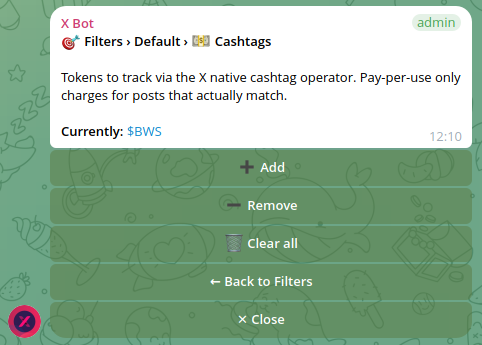
Tap 💵 Cashtags to configure cashtag tracking:

4. Add Your Project’s Cashtags#
Tap ➕ Add and send your cashtags space-separated:
$YOURTOKEN $YT $PROJECTNAMEInclude common variations users might type. If your token is “Alpha Protocol,” track both $ALPHA and $AP. Some communities use shortened versions or alternate spellings.
X Bot will now monitor every public post containing any of these cashtags.
5. Set Your Schedule#
Navigate to ⏰ Schedule and choose when reports fire. Most crypto projects use daily reports at strategic times:
- 09:00 UTC: Catches Asian market activity overnight
- 14:00 UTC: Mid-day European engagement
- 18:00 UTC: US market opening buzz
- 22:00 UTC: Evening social media peak
Pick a time when your community is most active to maximize leaderboard engagement.
Advanced Cashtag Strategies#
Combining Cashtags with Account Filters#
Many projects want to track both specific accounts AND cashtag mentions. For example, monitoring your 10 hired KOLs but only counting posts that mention $YOURTOKEN.
X Bot handles this through “named filters” — separate filter configurations that run independently:
- Create a “KOL Campaign” filter tracking specific accounts AND your cashtag
- Create a “Community Buzz” filter tracking just the cashtag from anyone
- Both filters contribute to the same leaderboard
This gives you granular visibility: are your KOLs posting about the token correctly? Is organic community discussion growing?
Handling Numeric Cashtags#
Some tokens have numeric prefixes like $1INCH. X’s API sometimes struggles with these patterns. If your cashtag tracking seems incomplete, add the token name as a keyword fallback:
- Cashtags:
$1INCH - Keywords:
1INCH token
This catches posts where the cashtag might not parse correctly.
The “Additive” Filter Behavior#
Important: X Bot’s filtering is additive across categories. If you configure:
- Accounts: @alice, @bob
- Cashtags: $YOURTOKEN
The bot tracks posts from Alice OR Bob OR posts mentioning $YOURTOKEN from anyone. It’s not requiring posts from Alice that also mention the cashtag.
For AND-logic (posts from specific accounts that also mention your cashtag), use named filters or consider filtering down to just cashtags if you want pure community tracking.
Real-World Cashtag Tracking Scenarios#
Scenario 1: Memecoin Launch#
You’re launching $MEMEKING and want to track all organic mentions. Configure:
- Cashtags:
$MEMEKING $MK $MEMEK - Schedule: Every 6 hours during launch week
- Auto-relay: Forward top mentions to your group immediately
This captures the viral spread of cashtag usage as your community grows.
Scenario 2: KOL Agency Campaign#
Your agency hired 15 influencers to post about $DEFI. Track compliance:
- Named Filter “KOL Posts”: Accounts (your 15 KOLs) + Cashtags ($DEFI)
- Named Filter “Organic Buzz”: Just cashtags ($DEFI) from everyone
- Daily reports showing both campaigns side-by-side
You’ll see which KOLs are posting correctly and whether organic discussion is growing.
Scenario 3: Established Project Monitoring#
Your $PROTOCOL token has been live for months. Track ongoing community health:
- Cashtags:
$PROTOCOL $PROTO - Keywords: “protocol token”, “proto defi”
- Exclude: Retweets (focus on original content)
- Weekly reports to avoid noise
This maintains pulse on community sentiment without overwhelming your Telegram.
Understanding X Bot’s Scoring System#
X Bot scores each tracked post using configurable weights:
- Likes: Base engagement signal
- Retweets: Amplification reach
- Replies: Conversation starter quality
- Quotes: Commentary and discussion
- Views: Raw exposure (when available)
Default weights work well for most projects, but you can adjust in 🎨 Customization → Scoring Weights. Some communities value replies more (discussion-focused) while others prioritize retweets (reach-focused).
The leaderboard shows each user’s total score from their tracked posts during the reporting period, plus their “best tweet” — the single highest-scoring post.
Common Cashtag Tracking Pitfalls#
Over-Broad Cashtag Selection#
Tracking $BTC alongside your project cashtag will flood your reports with Bitcoin discussion. Stick to cashtags specific to your project unless you’re intentionally monitoring broader market sentiment.
Missing Cashtag Variations#
Communities often create unofficial variations. Monitor your Telegram and Discord for emerging cashtag patterns. If users start typing $YOURPROJ instead of $YOURPROJECT, add it to your filter.
Forgetting Context Windows#
Reports only cover the configured period (daily, weekly, etc.). A user active 2 weeks ago won’t appear in today’s daily report, but their tracked posts remain available to longer report periods.
Ignoring Auto-Relay Settings#
The 📡 X Posts Auto-relay feature forwards tracked posts to your Telegram in real-time. This is powerful for urgent cashtag mentions but can overwhelm groups during viral moments. Configure carefully or disable during high-volume periods.
Integrating with Your Project Workflow#
Launch Week Strategy#
During token launch, maximize cashtag visibility:
- Share your tracking setup in announcements: “We’re tracking $YOURTOKEN mentions!”
- Use frequent reports (every 6 hours) to maintain excitement
- Enable auto-relay for immediate viral post sharing
- Publicly celebrate top community contributors
Long-Term Community Health#
Post-launch, focus on consistent monitoring:
- Switch to daily or weekly reports to reduce noise
- Create public leaderboards via X Bot’s public dashboard when your community reaches visibility thresholds
- Use leaderboard data for community rewards and recognition programs
- Track trends: is cashtag usage growing or declining?
KOL Campaign Management#
For paid influencer campaigns:
- Combine account filters with cashtag requirements
- Export leaderboard data for campaign performance reports
- Use historical tracking to verify posting schedules and compliance
- Compare organic vs. paid cashtag mention ratios
Pricing for Cashtag Tracking#
X Bot’s pricing scales with your tracking volume:
- FREE plan: 100 posts/month — perfect for small communities testing cashtag tracking
- PRO subscription: $19/month including 1,000 posts, then $0.02/post metered billing
- ETH credits: Pay-as-you-go at $0.02/credit, ideal for campaign bursts
Most single-cashtag tracking stays within the FREE plan unless you’re monitoring major tokens with high mention volume. See our complete pricing guide for detailed breakdowns.
Popular cashtags like $PEPE or $SHIB generate hundreds of daily mentions. Newer or niche project cashtags typically see 5-50 mentions daily, well within free limits.
Beyond Basic Cashtag Tracking#
Once your cashtag monitoring is running smoothly, consider expanding your tracking strategy:
Multi-Token Portfolios#
If you manage multiple projects, create separate named filters for each token’s cashtag. X Bot can track dozens of cashtags simultaneously in the same Telegram group.
Cross-Platform Correlation#
Combine X Bot’s cashtag data with Discord activity monitoring or Reddit mention tracking. X typically leads crypto discussions, with other platforms following trending cashtags.
Community Incentive Programs#
Use leaderboard standings to reward active community members. Many projects offer token airdrops, NFT rewards, or exclusive access based on X Bot leaderboard performance.
Market Sentiment Analysis#
Track cashtag mention volume and sentiment patterns around price movements. Sudden increases in cashtag activity often precede significant price action.
For more advanced community engagement strategies, check out our guide on tracking X activity for token launches.
Troubleshooting Common Issues#
Cashtag Not Appearing in Results#
- Verify spelling and exact format (
$TOKENnot$token) - Check if your cashtag conflicts with existing popular ones
- Add keyword fallbacks for problematic cashtags
- Wait 24-48 hours for X’s indexing to catch up
Missing Recent Posts#
X’s API has 5-15 minute delays. Recent posts may not appear immediately in reports. Auto-relay typically has shorter latency than scheduled reports.
Leaderboard Shows Unexpected Users#
Remember that cashtag tracking captures ANY user mentioning your cashtag. This includes critics, competitors, and unrelated discussions. Use account filters if you need more precise targeting.
For additional troubleshooting help, visit our support documentation or use ❓ Help & Support in the X Bot setup menu.
Getting Started with Cashtag Tracking#
Tracking your project’s cashtag across X provides essential visibility into community engagement and viral spread. X Bot automates this monitoring, delivering actionable insights directly to your Telegram group.
The setup takes under 5 minutes: configure your cashtags, set a schedule, and watch as organic and paid mentions flow into beautifully rendered leaderboards. Whether you’re launching a memecoin or managing established project communications, cashtag tracking helps you stay connected to your community’s pulse.
For a comprehensive overview of X Bot’s tracking capabilities beyond cashtags, read our comparison with manual spreadsheet tracking.
Ready to track your community on X? Add @BWS_X_Bot to your Telegram group, run /setup, and your first report fires on the configured schedule. The FREE plan covers 100 posts/month — no card required.
About this article: This post was drafted with AI assistance using X Bot’s content workflow and reviewed by Nacho Coll, Founder & Principal at Blockchain Web Services (BWS), before publishing. Every product claim is checked against the live bot. Read how we use AI in our content. Spot an error? Reach us via
/setup→ ❓ Help & Support.
About the author
Nacho Coll
Founder & Principal, Blockchain Web Services
Nacho leads the Blockchain Web Services (BWS) team that builds and operates X Bot — the Telegram bot that turns X (Twitter) activity into leaderboards for crypto communities. He writes about KOL performance tracking, the X API, and running analytics bots for Telegram groups, from the operator side of the wire. Building on blockchain and decentralized infrastructure since 2019.
- cashtag tracking
- $token x analytics
- cashtag monitoring telegram
- $btc cashtag tracker