X Bot Report Not Arriving in Telegram? A Step-by-Step Checklist
Scheduled X Bot report never showed up in your Telegram group? Work through the bot, credits, schedule and filter checks in order to find the cause in minutes.
 by Nacho Coll
Nacho leads the Blockchain Web Services (BWS) team that builds and operates X Bot — the Telegram bot that turns X (Twitter) activity into leaderboards for crypto communities.
It is 09:00 UTC, your community is waiting for the daily leaderboard, and the chat is quiet. No image, no best tweet, nothing. Before you assume the bot is broken, know that a missing report almost always comes down to one of five causes, and you can tell which one in a few minutes if you check them in the right order.
This checklist is written for community managers and agency operators, not engineers. Every step uses the /setup menu. If you get to the end without a fix, there is a short template for support too.
Before you start: copy the About screen#
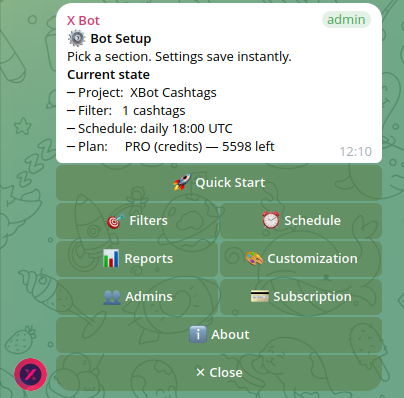
Open /setup in the affected group and tap ℹ️ About. It shows the chat ID, plan, schedule and project name. Copy those lines somewhere now. You will need them if you end up contacting support, and they also tell you at a glance whether you are looking at the chat you think you are.
Step 1: Does the bot answer at all?#
Type /setup in the group.
- No reply: the bot was kicked or lost its admin rights. Open the group’s admin list in Telegram, promote the bot again, and retry
/setup. If the bot is gone entirely, add @BWS_X_Bot back and run/setup. See Install X Bot in Your Telegram Group and Get Your First Report for the clean re-install path. - The menu appears: the bot is alive and can post. Move on.
This is the most common cause when a chat that worked for weeks suddenly goes silent. Group admin changes, ownership transfers and cleanups quietly remove the bot’s rights.
Step 2: Force a report with Generate report now#
Scheduled and manual reports use the same pipeline, so a manual run tells you whether the problem is the report or only the schedule.
Go to /setup → 📊 Reports → ⚡ Generate report now. Give it up to three minutes. Three outcomes are possible:
- A report image lands in the chat. The pipeline works. Your problem is the schedule, so go to Step 4.
- You receive an admin message saying no posts were found. The pipeline ran but your filter matched nothing in the period. Go to Step 5.
- Nothing arrives, or you get a credits message. Go to Step 3.
If you only want to re-post the latest cached image, the /report command does that without fetching new data. Our guide on pulling an on-demand report covers the differences.
Step 3: Check credits and plan#
A chat that has run out of posts cannot fetch, so no report is generated.
- FREE plan: 100 posts per month is a hard cap. When the counter reaches 100 of 100, reports stop until the monthly reset.
- ETH credit pack: the balance drains first on each fetch. If it reaches zero and you have no PRO subscription, the chat falls back to the FREE allowance.
- PRO subscription: the plan includes 1,000 free posts per month, then metered overage at $0.02 per post, so it should not stall on volume unless the subscription itself lapsed (for example a failed card renewal).
Open /setup → 💳 Buy Credits and read the plan summary and the Usage this month screen. Compare posts fetched with fetch attempts: many attempts and zero posts points to a failing fetch rather than a quiet account.
For a full walk-through of these screens, read Check Your X Bot Credit Usage: Where Did My Posts Go?. If you need more headroom, X Bot Pricing: FREE, ETH Credits, or $19/Month explains how the paths layer.
Step 4: Check the schedule#
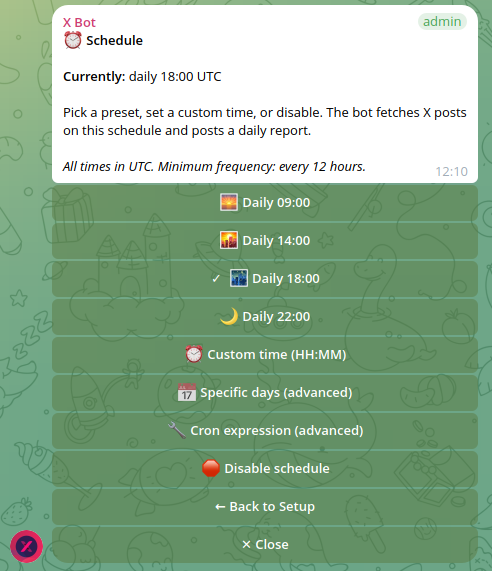
If Generate report now worked but nothing arrives on its own, the schedule is the suspect. Open /setup → ⏰ Schedule and look at what is actually set.
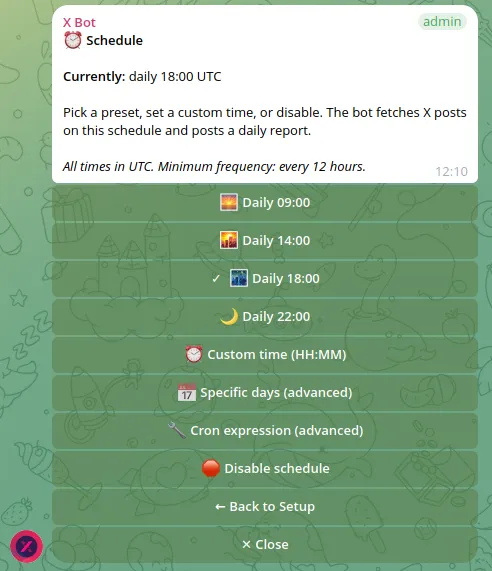
Four things trip people up:
- Time zone. Schedules are in UTC. A report set for 09:00 arrives at 09:00 UTC, which may be the middle of the night, or the middle of the afternoon, for your community. Convert your local time before assuming a miss.
- Give it five minutes. Scheduled reports fire within a minute or two of the tick. Wait about five minutes after the configured time before deciding it did not run.
- The 12-hour rule. The bot refuses schedules that fire more often than every 12 hours. If you tried to set something like every six hours, the change was rejected with a message naming the offending hours, and your old schedule may still be in force.
- Hour order in custom crons. For a twice-daily custom expression, list the hours in ascending order, for example 14 then 22. A descending list is rejected.
If you are using a custom expression, Custom Report Schedules: Cron Expressions for X Bot shows working examples.
One more distinction: X Posts Auto-relay runs on its own polling, independent of the report schedule. A relay posting tweets while reports stay silent (or the other way round) does not mean either one is broken.
Step 5: Check the filter and period#
If the admin message said no posts were found, the report did not fail. It ran against a filter or window that matched nothing.
- Open
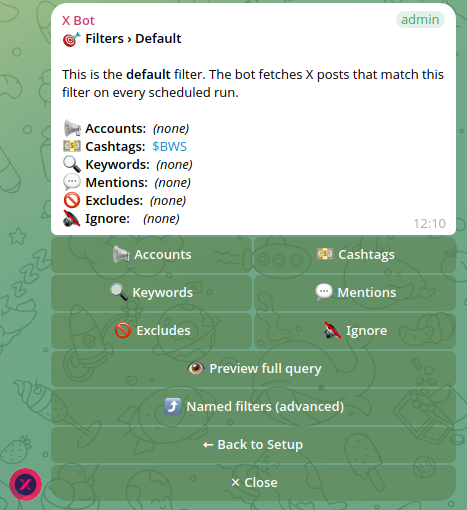
/setup→ 🎯 Filters and read the literal query. A typo in a handle or cashtag is the usual culprit. - If you set a fixed period for a contest or campaign, it may have ended or not started yet. In 📊 Reports, clear the period to return to the default rolling 24 hours, which is more forgiving.
- Widen the filter temporarily: add a cashtag or drop a strict keyword group, then run Generate report now again.
Filters combine in ways that surprise people, especially named filters. Empty X Bot Report? Match ANY vs Match ALL Filters Explained goes through that in detail.
Step 6: Look for admin alerts#
When something fails during a scheduled run, the bot sends a message to the chat’s admins. Check your direct messages with the bot. If you are an admin but never started a conversation with it, open the bot once and press start so it can reach you. What X Bot’s Admin Alerts Mean lists what each alert means and what to do about it.
Quick reference#
| What you see | Most likely cause | First action |
|---|---|---|
/setup gets no reply | Bot kicked or demoted | Re-promote as admin |
| Generate report now posts a report, schedule silent | Schedule or time zone | Check ⏰ Schedule, remember UTC |
| Admin message: no posts found | Filter or period matches nothing | Check 🎯 Filters, clear period |
| Nothing at all, or a credits message | Credits exhausted | Check 💳 Buy Credits |
| Alerts in DMs | Fetch or delivery error | Read the alert text |
When X Bot is not the problem#
Be realistic about two things. First, X Bot can only report on public posts it can fetch, so a quiet week on X produces a thin report, not a missing one. Second, if a specific X API error appears in an alert, it is an operator-side issue that you cannot fix from the menu. In that case contact support rather than reconfiguring.
Contacting support#
If the checks above do not resolve it, open /setup → ❓ Help & Support and send a ticket. Include these lines:
Project:        <your project name>
Chat ID:        <from /setup → ℹ️ About>
Plan:           FREE / PRO credits / PRO subscription
What is wrong:  <one or two sentences>
What you tried: <the steps above you ran>
When it broke:  <approximate UTC time>
Recent change:  <any new filter, schedule or payment in the last 24 hours>
The chat ID alone gives support most of what they need. How X Bot Support Tickets Work explains how replies reach you. For the full symptom tables, see the Troubleshooting docs, and the setup menu reference if you cannot find a screen mentioned here.
Ready to track your community on X? Add @BWS_X_Bot to your Telegram group, run /setup, and your first report fires on the configured schedule. The FREE plan covers 100 posts/month — no card required.
About this article: This post was drafted with AI assistance using X Bot’s content workflow and reviewed by Nacho Coll, Founder & Principal at Blockchain Web Services (BWS), before publishing. Every product claim is checked against the live bot. Read how we use AI in our content. Spot an error? Reach us via
/setup→ ❓ Help & Support.
About the author
Nacho Coll
Founder & Principal, Blockchain Web Services
Nacho leads the Blockchain Web Services (BWS) team that builds and operates X Bot — the Telegram bot that turns X (Twitter) activity into leaderboards for crypto communities. He writes about KOL performance tracking, the X API, and running analytics bots for Telegram groups, from the operator side of the wire. Building on blockchain and decentralized infrastructure since 2019.
- x bot report not arriving
- telegram bot not posting reports
- x bot schedule not firing
- x bot troubleshooting