Custom Report Schedules: Cron Expressions for X Bot
X Bot supports daily presets, custom times, or full cron expressions for report timing, with a 12-hour minimum interval. Here is how to pick the right cadence.
 by Nacho Coll
Nacho leads the Blockchain Web Services (BWS) team that builds and operates X Bot — the Telegram bot that turns X (Twitter) activity into leaderboards for crypto communities.
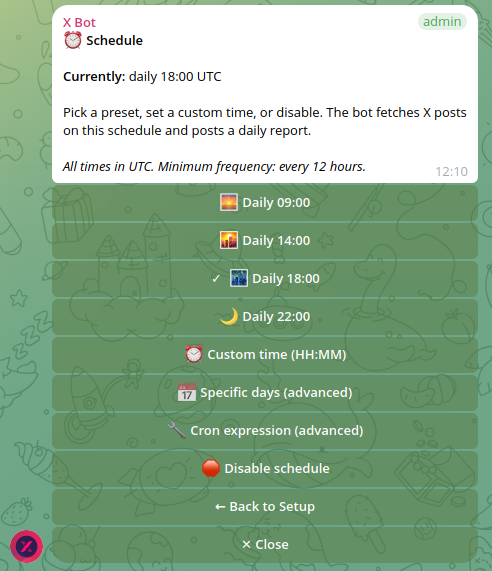
The default report time works fine until it doesn’t. A community manager running a weekday-only project doesn’t want a report firing on Saturday. A KOL agency juggling clients across three timezones wants the report to land when their own team is actually online to review it. A token-launch coordinator wants extra check-ins during launch week and silence for the rest of the month. X Bot’s ⏰ Schedule menu handles all three cases — you just have to know it’s there, because the default preset is good enough that most people never open it.
This post walks through the three ways to set a report schedule, why every time is UTC, why there’s a 12-hour minimum between fires, and which setting fits which kind of team.
The three schedule tiers#
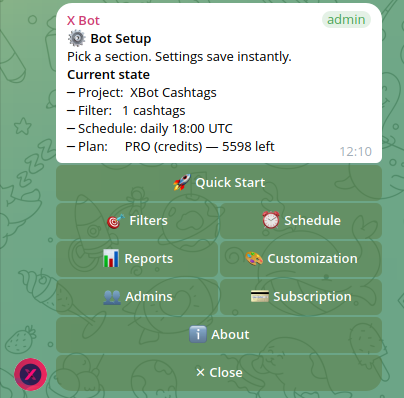
Open /setup → ⏰ Schedule and you’ll find three options, roughly in order of how much control you want:
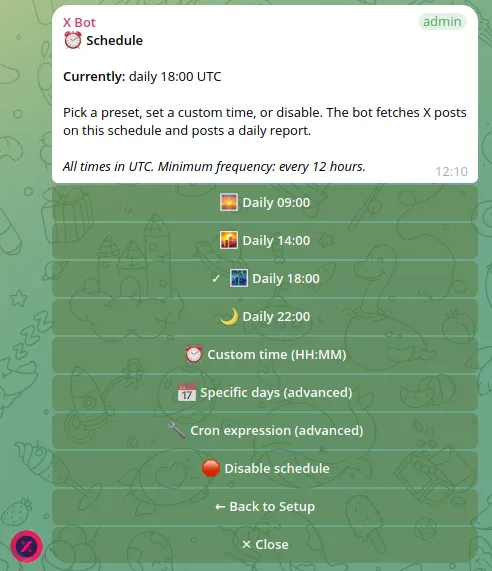
1. Daily presets. Four fixed times: 09:00, 14:00, 18:00, and 22:00 UTC. Pick one and you’re done — this is what most chats use, and it’s the fastest path if you just want a report every day without thinking about timezones.
2. Custom time and days. Set any HH:MM, and optionally restrict which days of the week it fires. This is where the weekday-only project or the “report only on Mondays and Thursdays” community lives. It’s still a single fixed time per day, just not locked to one of the four presets.
3. Full cron expression. For anyone who wants more than one fire per day, or an irregular pattern a simple time-and-days picker can’t express, X Bot accepts a raw cron expression. This is the power-user tier — most chats don’t need it, but it’s there for launch weeks, multi-fire monitoring windows, or anything a standard schedule can’t represent.
All three tiers respect the same underlying constraint: reports can fire no more often than once every 12 hours.
Switching between tiers is not a one-way door. A chat can start on a daily preset, move to a custom time once the team figures out its real rhythm, and drop into a cron expression for a specific event — then move back down to a preset once that event is over. Nothing about the filters, the named-filter setup, or the report history changes when you switch tiers; ⏰ Schedule only controls when the next fire happens, not what gets reported.
Reading (and writing) a cron expression#
If you’ve never touched cron before, the syntax looks more intimidating than it is. A cron expression is five fields, each separated by a space, in this order: minute, hour, day of month, month, day of week. 0 14 * * 1-5 means “at minute 0 of hour 14 (14:00 UTC), every day of the month, every month, Monday through Friday.” The * fields mean “any value” — you’re only filling in the fields you actually want to constrain.
Two fires a day looks like 0 9,21 * * * — minute 0, hours 9 and 21 (comma-separated for “either of these”), every day. That respects the 12-hour floor exactly (9:00 to 21:00 is 12 hours, and 21:00 back to 9:00 the next day is also 12 hours). Trying to squeeze a third fire into the same day — say 0 6,14,21 * * * — would violate the minimum-interval rule between the first two fires and won’t be accepted.
The most common mistake with the cron tier isn’t the syntax, it’s forgetting that the hour field is UTC. A cron expression that looks right because it matches a familiar local-time pattern (like “9 and 5, business hours”) can quietly fire at 4am and midnight local time if you forget to convert first.
Why there’s a 12-hour minimum#
Every time you set in ⏰ Schedule — preset, custom HH:MM, or the hour fields inside a cron expression — is interpreted in UTC, not your local timezone or the group’s. If your team is in UTC-5 and you want a 9am-local report, you set 14:00, not 09:00.
This matters most for agencies working across timezones. There’s no per-chat timezone setting, so the practical move is to pick the UTC time that lines up with when your team actually reviews the report, not the time that “feels like morning” in your head. Write the UTC offset down somewhere — a pinned message in the group, a note in your onboarding doc — so nobody has to re-derive it every time schedule questions come up.
Why there’s a 12-hour minimum#
You can’t set a schedule that fires more than twice a day. This isn’t an arbitrary restriction — it’s the same guardrail that keeps the per-fetch cost model sane. Every scheduled fire triggers a fetch against tracked filters, and fetches are what consume FREE-plan posts, PRO subscription credits, or ETH credits (see how X Bot pricing works for the full breakdown). A schedule with no floor would let a misconfigured cron burn through a monthly cap in hours instead of weeks.
In practice, the 12-hour floor rarely bites. Most teams settle on once daily. The chats that push toward the floor are usually short, deliberate windows — a launch week where a coordinator wants a morning and evening check-in — not a permanent setting.
It’s also worth separating “how often the bot fetches” from “how often you’d actually want to read a report.” Even for a chat that could technically afford two fires a day cost-wise, more reports doesn’t automatically mean more signal. A leaderboard that resets or re-renders every 12 hours on a slow-moving community just produces two near-identical images your team skims past. The floor is a cost guardrail, not a target — treat “how often is this actually useful” as the real question, and let the 12-hour minimum be a backstop rather than a goal.
Report fatigue is a real cost too#
Teams that are new to X Bot sometimes reach straight for the most frequent schedule they’re allowed, on the theory that more data is strictly better. In our own usage across agency and project chats, the opposite failure mode shows up more often: a report that fires more frequently than the underlying activity changes gets muted, then ignored, then nobody notices when it stops being useful at all. A weekly digest that the whole team reads beats a twice-daily report that scrolls past unread.
If you’re unsure what cadence fits, a reasonable default is to match the schedule to your team’s own check-in rhythm — daily standup teams want a daily preset timed just before the standup; async teams that check in less often are usually better served by a custom weekday-only or even a less-than-daily pattern via cron.
Worked examples#
Solo KOL, daily digest. A single daily preset (say, 18:00 UTC, end of the US trading day) is plenty. There’s no team to coordinate around, so the only real decision is picking a time you’ll actually read the report at. See X Bot for solo KOLs for the rest of the solo setup.
Community manager, weekday office hours. Custom time + specific days (Mon–Fri, 14:00 UTC) keeps weekend noise out of the chat. If your community goes quiet on weekends anyway, there’s nothing useful to report — a Saturday fire just adds clutter.
Token-launch coordinator, launch week. This is the case for a full cron expression: two fires a day (respecting the 12-hour floor) during the launch window, dropping back to a single daily preset once the campaign settles into steady state. Combine this with the account and cashtag filters described in tracking X activity for a token launch so the extra fires are actually catching campaign-relevant posts, not just doubling up on noise.
Multi-client agency, shared schedule. If you’re running multiple client campaigns as named filters in one chat, all of them share the same chat-level schedule — there’s one ⏰ Schedule setting per chat, not one per named filter. Each named filter still produces its own separate report image at every fire; the schedule just controls when that batch of reports goes out, not which filter gets which cadence. If two clients genuinely need different report times, that’s a signal to split them into separate chats rather than fight the shared schedule.
When a report doesn’t fire#
If a report silently stops showing up, the schedule itself is rarely the cause — it’s usually a plan cap, a permissions change, or a filter that stopped matching anything. Check the troubleshooting guide before assuming the cron expression is wrong; a hand-written cron string is the one place a typo is genuinely likely, so double check it there first if you’re on tier three.
The honest tradeoff#
The three-tier system is deliberately layered: presets for the common case, custom time/days for the next step up, and cron only for the cases that actually need it. If you’re reaching for a cron expression and you’re not sure why, it’s worth asking whether a custom time-and-days setting would do the same job with less to maintain. Cron expressions are powerful but they’re also the setting most likely to be misread six months from now when someone else in the team opens ⏰ Schedule and has to guess what 0 9,21 * * 1-5 means.
Ready to track your community on X? Add @BWS_X_Bot to your Telegram group, run /setup, and your first report fires on the configured schedule. The FREE plan covers 100 posts/month — no card required.
About this article: This post was drafted with AI assistance using X Bot’s content workflow and reviewed by Nacho Coll, Founder & Principal at Blockchain Web Services (BWS), before publishing. Every product claim is checked against the live bot. Read how we use AI in our content. Spot an error? Reach us via
/setup→ ❓ Help & Support.
About the author
Nacho Coll
Founder & Principal, Blockchain Web Services
Nacho leads the Blockchain Web Services (BWS) team that builds and operates X Bot — the Telegram bot that turns X (Twitter) activity into leaderboards for crypto communities. He writes about KOL performance tracking, the X API, and running analytics bots for Telegram groups, from the operator side of the wire. Building on blockchain and decentralized infrastructure since 2019.
- telegram bot custom schedule
- cron expression telegram bot
- x bot report timing
- schedule kol reports