Empty X Bot Report? Match ANY vs Match ALL Filters Explained
Combined accounts, cashtags and keywords filter returning nothing? Learn how X Bot joins criteria with ANY or ALL, and how to switch it in /setup.
 by Nacho Coll
Nacho leads the Blockchain Web Services (BWS) team that builds and operates X Bot — the Telegram bot that turns X (Twitter) activity into leaderboards for crypto communities.
You set up X Bot, added your project’s official account, your cashtag and a couple of keywords, and waited for the first leaderboard. It arrived as an admin notice saying no posts were found. The project is clearly being talked about on X. You can see it yourself. So where did the posts go?
Nine times out of ten, the answer is not a bug and not a quiet week on X. It is the way the filter joins your criteria together. This post explains the two modes X Bot uses, match ANY and match ALL, how to see which one your chat is using, and how to switch between them in under a minute.
The setup that catches almost everyone#
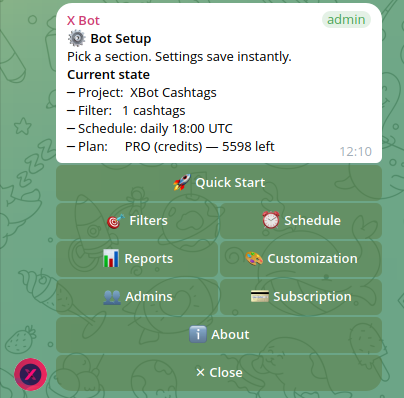
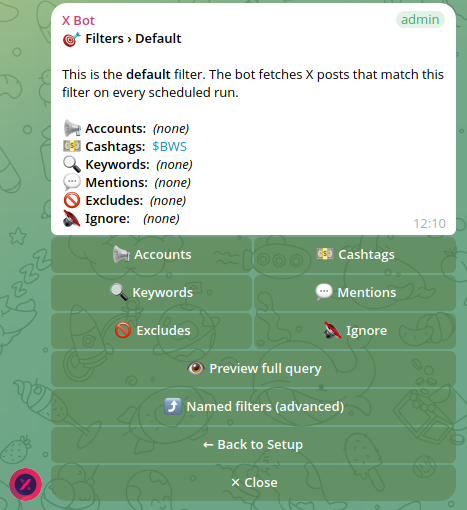
Open /setup → 🎯 Filters and you get a menu of criteria groups:
- 📢 Accounts — posts from specific X handles
- 💵 Cashtags — posts carrying
$YOURTOKEN - 🔍 Keywords — words or phrases
- 💬 Mentions — posts mentioning a handle
It is natural to fill in several of them. You are describing everything you want to hear about: our account, our ticker, our campaign phrase, anyone who mentions us. In your head that is a list of ways to find your project.
But a search engine does not read lists the way people do. If the groups were joined with AND, the filter would mean: “posts from this account that also carry this cashtag that also contain this keyword.” That is a very small set. An official account rarely writes the exact phrase and the cashtag in the same post, and when it does, it is one post in a month, not a leaderboard.
This is the trap. Each group you add makes an AND filter narrower, not broader. Someone who adds more criteria hoping for more coverage gets less, and eventually gets nothing.
What X Bot does by default#
X Bot’s default is match ANY. A post only needs to satisfy one of your criteria groups to count. Behind the scenes the groups are joined with OR, so the account, the cashtag, the keywords and the mentions each pull posts in independently.
We made ANY the default after looking at how chats were actually configured. Filters that combined two or more kinds of criteria were far less likely to ever produce a report than single-criterion filters, and in several cases the chat had run its schedule for weeks and never delivered one. People listing an account and a cashtag were describing a union, and the old behaviour gave them an intersection.
The alternative, match ALL, is still there. It is the right choice for a narrow set of questions, which we cover below. The point is that you choose it on purpose rather than falling into it.
If your chat was configured before you read this and you set a mode explicitly, your choice stands. The default only applies where no mode was stored.
Check which mode your chat is using#
Do not guess. X Bot will show you the exact query it sends to X.
- Open
/setup→ 🎯 Filters. - Tap 🔎 Preview query.
The preview screen starts with one of two sentences:
- “Your filter matches posts where ANY of these is true:” followed by your groups joined by
OR. - “Your filter matches posts where ALL of these are true:” followed by your groups joined by
AND.
Below that, under Sent to X as, is the literal query string. This is the most reliable diagnostic in the product. If a post you expected is missing, read the string and ask yourself whether that post could satisfy it.
When the mode is ALL and you have more than one group, the preview adds a warning that several conditions must hold at once, and that a post matching only some of them will not appear. That warning is the same situation described above: if your criteria are different ways to find your project, you want ANY.
Switching modes#
The preview screen is also where you change the mode. It only shows the toggle when you have two or more criteria groups, since a single group has nothing to join.
- In ALL mode you see 🔓 Broaden: match ANY.
- In ANY mode you see 🎯 Narrow: require ALL.
Tap it, and the stored query is rebuilt. Then run a report from the top of /setup with ⚡ Run report to see the effect without waiting for the schedule.
One guard rail to know about: broadening can make the query longer, and X limits query length. If switching to ANY would push the query past that limit, X Bot refuses the change and tells you so, rather than saving a filter that would fail on the next fetch. In that case trim the longest group first, usually keywords or a long list of accounts, and try again.
What never changes between modes#
Two things are applied the same way whichever mode you pick.
The ignore list. Accounts under 🔇 Ignore are always excluded. The bot adds them as negations on top of whatever your criteria select. They are never OR-ed in, because “not from this spammer, or anything else” would match nearly everything on X. So you can broaden a filter without worrying that an ignored account sneaks back in.
Excludes. The 🚫 Excludes toggles for retweets, replies and quotes also hold in both modes. The preview screen says it plainly: “Always excluded (in either mode).” If you are tuning noise, the post on cleaning up noisy X Bot reports goes through both in detail.
This matters for one practical reason. If your report is empty and you suspect the match mode, you can switch it without re-checking the ignore list and excludes. They are independent.
When ANY is right#
Match ANY is the right fit when your criteria are alternative routes to the same community:
- A token launch. Your official handle, the cashtag, the campaign hashtag phrase and a mention of the project account are all different ways a relevant post can show up. See tracking cashtags across X for crypto projects for how to pick the cashtag half well.
- A pre-launch community. You have a brand keyword and a founder handle, but no ticker yet.
- An agency tracking a roster. Several KOL handles are listed under Accounts; each one is a separate way into the leaderboard.
In all of these, you want a post to count if it matches any route in.
When ALL is right#
Match ALL is for intersections, where you truly want posts that satisfy several conditions together. Examples:
- You want posts that carry your cashtag and a specific campaign phrase, to measure only the participants who followed the brief.
- You track a topic keyword but only when it appears alongside a particular mention.
These are legitimate, and ALL will serve you well, provided the intersection is something people actually post. A quick test before you commit: open the preview, copy the query, and search it yourself on X. If the results are thin or empty, a leaderboard built on it will be too.
A reasonable rule of thumb: start with ANY, check the first report, then narrow only if you see noise that ignore and excludes cannot fix.
The credit tradeoff, honestly#
Broader matching is not free. Every matching post counts toward your usage, and the preview screen notes that broader matching uses credits faster. On the FREE plan, which has a hard cap of 100 posts a month, a loose ANY filter on a busy ticker can reach the cap sooner than a tight ALL filter would. On a PRO subscription or with an ETH credit pack the same thing shows up as spend.
This is a real tradeoff, not a footnote. If you are on the FREE plan and your project is chatty, consider:
- Keeping the criteria list short. Two or three strong signals beat eight weak ones.
- Using the ignore list for the handful of accounts that generate most of the volume.
- Turning off retweets in 🚫 Excludes if amplification is not what you are measuring.
For the full billing picture, including how credits drain, see how X Bot pricing works.
A five-step checklist for an empty first report#
Work through these in order. Most empty reports resolve in the first two.
- Preview the query.
/setup→ 🎯 Filters → 🔎 Preview query. Read the sentence at the top. Is it ANY or ALL? - Switch to ANY if you listed several kinds of criteria. Tap 🔓 Broaden: match ANY, then ⚡ Run report.
- Check the period. With no period set, the bot uses a rolling 7-day window. Open
/setup→ 📆 Period to confirm the window covers days when your community actually posted. - Look for over-aggressive exclusion. An ignore list or excludes that remove your main posters will leave the leaderboard thin even with perfect matching.
- Clear stale cache if you changed filters. Cached posts are tied to the filter window and reused on every report. 🧹 Clear cached posts under Filters wipes them so the next run refetches. Be aware that the next report starts empty until the cache refills and that new fetches use credits as usual.
If you have worked through all five and the report is still empty, the troubleshooting guide in the docs has a full self-diagnosis flow, and the support ticket path in /setup → ❓ Help & Support reaches a human. Include the chat ID from ℹ️ About; it speeds triage considerably. See the troubleshooting guide and the /setup menu reference.
Does this apply to named filters?#
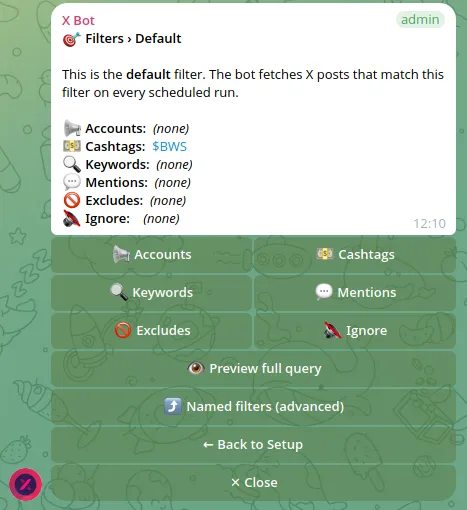
Named filters, the advanced feature agencies use to run several campaigns from one chat, live under 🎯 Filters → ⤴ Named filters (advanced). The match-mode toggle and preview described here belong to the default filter. If you are running multiple campaigns, the multi-client tracking guide covers how named filters are set up and reported.
The short version#
- Several criteria groups in one filter does not mean more coverage under AND. It means less.
- X Bot defaults to match ANY, so each group is an independent route into the leaderboard.
- 🔎 Preview query shows you the mode and the exact string sent to X. Use it first.
- 🔓 Broaden: match ANY and 🎯 Narrow: require ALL flip the mode.
- Ignore list and excludes apply in both modes.
- Broader matching can use credits faster, so keep the criteria list lean.
Ready to track your community on X? Add @BWS_X_Bot to your Telegram group, run /setup, and your first report fires on the configured schedule. The FREE plan covers 100 posts/month — no card required.
About this article: This post was drafted with AI assistance using X Bot’s content workflow and reviewed by Nacho Coll, Founder & Principal at Blockchain Web Services (BWS), before publishing. Every product claim is checked against the live bot. Read how we use AI in our content. Spot an error? Reach us via
/setup→ ❓ Help & Support.
About the author
Nacho Coll
Founder & Principal, Blockchain Web Services
Nacho leads the Blockchain Web Services (BWS) team that builds and operates X Bot — the Telegram bot that turns X (Twitter) activity into leaderboards for crypto communities. He writes about KOL performance tracking, the X API, and running analytics bots for Telegram groups, from the operator side of the wire. Building on blockchain and decentralized infrastructure since 2019.
- x bot empty report
- telegram bot filter match any all
- combine accounts and cashtags filter
- x search query and or