Run Report vs /recreate: Regenerating Your X Bot Leaderboard Safely
Changed your filters or weights and want a fresh leaderboard now? Learn when to use Run report or /recreate, what delete-history wipes, and what a re-fetch costs.
 by Nacho Coll
Nacho leads the Blockchain Web Services (BWS) team that builds and operates X Bot — the Telegram bot that turns X (Twitter) activity into leaderboards for crypto communities.
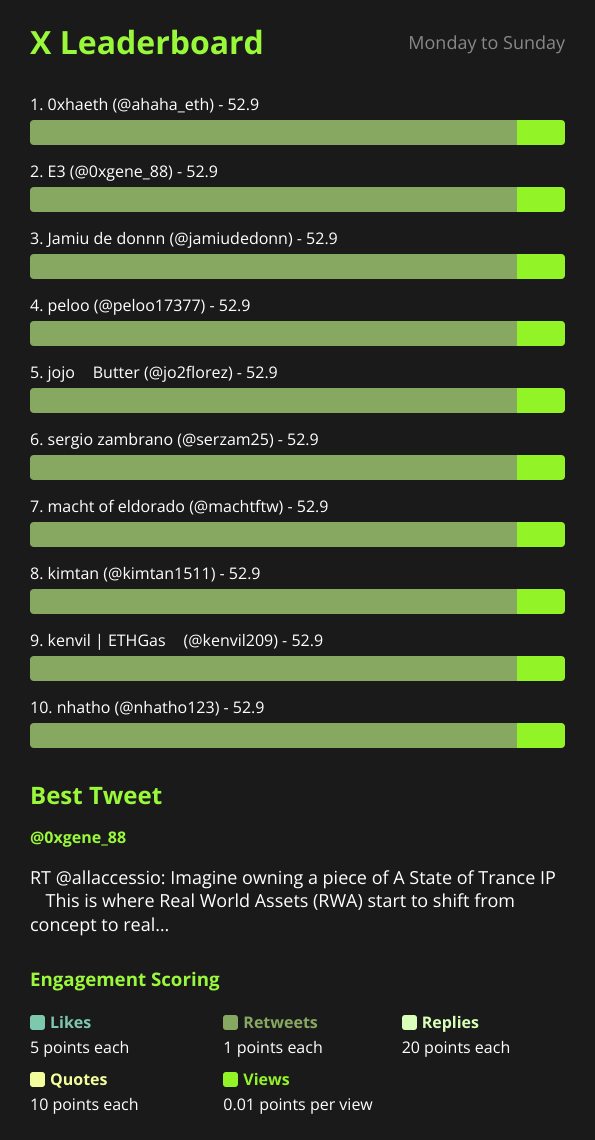
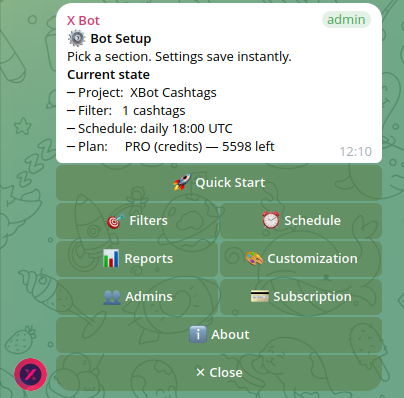
You have just spent ten minutes tuning your X Bot setup. You added two KOL handles, switched off retweets, nudged the score weights. The next scheduled report is fourteen hours away, and the client call is in one. What you want is a fresh leaderboard built from the new settings, now.
X Bot gives you three different ways to get a report into the chat on demand, and they are not interchangeable. One resends what already exists. Two go back to X and rebuild. Picking the wrong one either wastes posts from your allowance or leaves you staring at a stale image and wondering whether your changes did anything.
This guide sorts out which is which, what each one touches, and the one flag that deserves a pause before you type it.
The three ways to get a report now#
| Action | Fetches from X again? | Uses allowance? | Use it when |
|---|---|---|---|
/report | No | No | You want to see the last report again |
/setup then ⚡ Run report | Yes | Yes | You changed something and want a fresh leaderboard |
/recreate | Yes | Yes | Same as Run report, from a slash command |
/recreate delete-history | Yes, after wiping stored tweets | Yes | You want to rebuild from a clean slate |
The first row is covered in detail in how to pull an on-demand X report. It resends an image that was already generated, so nothing new is fetched and nothing is spent. That is exactly why it is the wrong tool after a settings change: the old image will look identical, because it is the old image.
The rest of this article is about the other rows.
Run report: the button path#
For most admins the button is the right place to start, because it lives where you were already working.
- Open
/setupin your group. - On the top menu, tap ⚡ Run report.
- The menu confirms that report generation started, and the bot posts a short “Generating leaderboard” message into the chat itself, so members who are not looking at your menu can see something is happening.
- Wait. The finished leaderboard image lands in the chat, typically within one to three minutes.
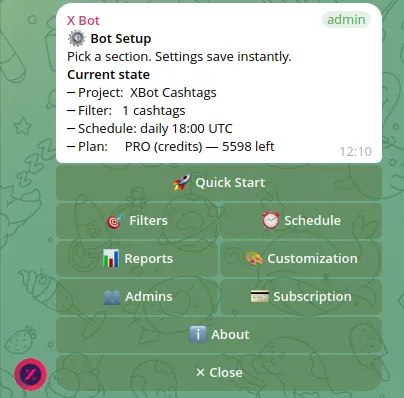
Under the hood, the button and /recreate start the same fetch-and-render job. They share the same guards, so what you learn about one applies to the other. The difference is that /recreate also accepts the delete-history option, which the button does not.
/recreate: the command path#
Type /recreate in the group and the bot replies that it is recreating the report and asks you to wait. Same one-to-three-minute window, same result: a new report image posted into the chat.
Two things to know about who can run it:
- Only group admins. A regular member who types it gets a message saying only admins can recreate the report. This is deliberate, because it spends allowance. If you want a trusted teammate to be able to refresh reports, add them properly; the admin roles guide walks through how.
- Inside the right topic. If you have pointed reports at a forum topic, the command has to be used where the bot allows it. Otherwise it replies that the command is not allowed in this topic.
The guards that will say no#
Both paths refuse to run in a few situations. These refusals are protective, and each message tells you what to fix.
No filter configured. A fresh leaderboard needs something to track. If you have not set up at least one filter, the bot tells you to configure one first. Go to /setup then 🎯 Filters and add an account, cashtag, or keyword. If your filters exist but the report comes back empty, that is a different problem: see Match ANY vs Match ALL.
The period starts in the future. If you have set a calendar period whose start date has not arrived yet, /recreate declines and tells you the date. The report will begin automatically when the period starts. This is the situation you hit when you configure a contest ahead of time, as in the fixed-dates contest guide. There is nothing to regenerate before the window opens.
A run is already in progress. This one saves you money. If a report is already being generated for the chat, the bot answers that one is underway, tells you how many seconds ago it started, and asks you not to retrigger it. Before this guard existed, impatient double taps queued identical leaderboards one after another, each one a separate fetch. If you tapped and nothing seems to have happened, wait the full three minutes before trying again.
What /recreate delete-history actually does#
Adding delete-history after the command is the part to treat with care:
/recreate delete-historyIn addition to starting a new fetch, this wipes the stored tweet data the bot keeps for your chat before it rebuilds. The new report is then built from a clean slate rather than on top of what was already collected.
Why would you want that? A few real cases:
- You tracked the wrong thing for a while. Say a filter pulled in a lot of unrelated posts for a week before you noticed. Fixing the filter changes what is fetched from now on, but data already collected is still sitting there.
- You are starting a new campaign in the same chat and do not want the previous campaign’s posts mixed into the new leaderboard. For a clean, dated window, setting a period is usually the better tool, so try that first.
- Test posts from setup day are polluting the numbers and you want them gone.
Why would you not want it? Because it is a deliberate deletion, and the old data does not come back. If a client has asked for last month’s numbers, take a screenshot of the report first. Think of it as the difference between refreshing a page and clearing the cache. When in doubt, use the plain version without the flag.
Also note that the flag only exists on the slash command. The ⚡ Run report button never deletes anything, which makes it the safer default.
What a re-run costs#
Every regeneration goes back to X to pull posts, and pulled posts count against your plan. The bot itself says new credits will be consumed when you recreate. So the practical rule is to batch your changes first and regenerate once.
Here is how that plays out on each plan:
- FREE plan: 100 posts per month, a hard cap. A few careless re-runs on a busy filter can eat a meaningful slice of it.
- PRO subscription: $19 per month, including 1,000 free posts per month, then $0.02 per post.
- ETH credit pack: $0.02 per credit, never expire, and they drain first on each fetch.
For the full layering of those paths, read how X Bot pricing works, and to see where your posts went, check your credit usage and plan.
A sensible workflow when you are tuning:
- Make all your changes in one sitting: filters, excludes, weights, top count.
- Run the report once.
- Read it carefully before touching anything else.
- If you need another change, make it, then run again.
Tweaking one setting, regenerating, tweaking another, and regenerating again is the expensive way to do the same job.
When not to regenerate at all#
Some changes do not need a fresh fetch to look right, and some problems a re-run will not fix.
- You only want to look at the last report again. Use
/report. Free of charge. - The scheduled report is due in an hour. Just wait. Nothing is gained by pulling early.
- The report did not arrive at all. Regenerating will not fix a delivery problem and may just queue another undelivered image. Work through the troubleshooting checklist first.
- A KOL says they posted and the bot disagrees. Check the filter and ignore list before burning allowance on a re-run that will return the same result.
A quick worked scenario#
An agency owner adds a third KOL handle to a campaign filter at 15:00 and wants the client to see the updated leaderboard at 16:00.
- They open
/setup, then 🎯 Filters, and add the handle. - They also switch on the retweet exclude while they are there.
- They go back to the top menu and tap ⚡ Run report once.
- They see the “Generating leaderboard” message in the chat and leave it alone.
- Two minutes later the new image appears with the third KOL on it.
One fetch, one cost, and nothing deleted. Had they typed /recreate delete-history instead, the result would look similar, but the stored history would be gone as well, which they did not need.
Honest limits#
Regeneration is a blunt instrument. It rebuilds the report from what X returns for your filters at that moment; it will not conjure posts that your filters do not match, and it does not bypass the plan cap. It also does not replace the schedule: for steady reporting, set up the cron schedule and let it do the work. Use manual runs for the moments when a settings change or a client request cannot wait.
For menu navigation details, the setup menu documentation lists each screen, and the troubleshooting page covers the rest.
Ready to track your community on X? Add @BWS_X_Bot to your Telegram group, run /setup, and your first report fires on the configured schedule. The FREE plan covers 100 posts/month — no card required.
About this article: This post was drafted with AI assistance using X Bot’s content workflow and reviewed by Nacho Coll, Founder & Principal at Blockchain Web Services (BWS), before publishing. Every product claim is checked against the live bot. Read how we use AI in our content. Spot an error? Reach us via
/setup→ ❓ Help & Support.
About the author
Nacho Coll
Founder & Principal, Blockchain Web Services
Nacho leads the Blockchain Web Services (BWS) team that builds and operates X Bot — the Telegram bot that turns X (Twitter) activity into leaderboards for crypto communities. He writes about KOL performance tracking, the X API, and running analytics bots for Telegram groups, from the operator side of the wire. Building on blockchain and decentralized infrastructure since 2019.
- regenerate x bot report
- recreate leaderboard telegram
- run report x bot
- delete-history x bot