Cleaning Up Noisy X Bot Reports: Excludes & Ignore List
Retweets, quote spam, or one troll account can drown out real signal in your X Bot leaderboard. Here's how excludes and the ignore list fix that in /setup.
 by Nacho Coll
Nacho leads the Blockchain Web Services (BWS) team that builds and operates X Bot — the Telegram bot that turns X (Twitter) activity into leaderboards for crypto communities.
Your first X Bot report looks great for about a week. Then someone in the community starts quote-tweeting every post just to farm a leaderboard spot, or a KOL’s retweets start outscoring their original content, and suddenly the “best tweet” of the day is a low-effort quote with a single word in it. The leaderboard still technically works — it’s just not measuring what you actually care about anymore.
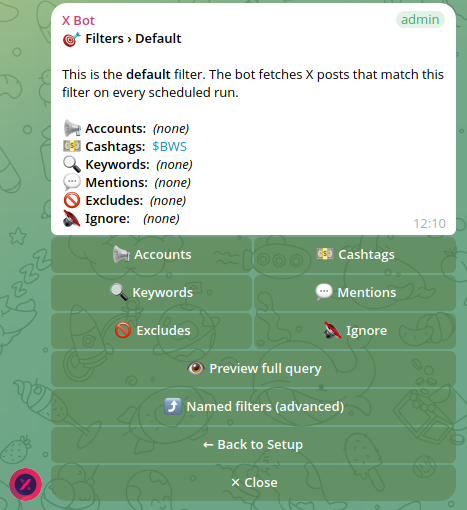
This is the most common complaint we hear from agencies and community managers a few weeks into using X Bot, and it has a fix that most people don’t discover until they go looking for it: excludes and the ignore list, both tucked inside 🎯 Filters.
Why reports get noisy in the first place#
X Bot scores every tracked post using weighted engagement (likes, retweets, replies, quotes, views), then ranks users by their total score for the period. That’s the right default for most chats. But two specific patterns break it:
- Post-type noise. A handful of accounts get most of their score from retweets or replies rather than original posts. If your goal is “who’s actually creating content about us,” a retweet-heavy leaderboard is misleading.
- Bad-actor noise. One account — a bot, a troll, someone gaming the score for a giveaway — keeps posting or quote-tweeting specifically to appear on the leaderboard, and their score crowds out the real contributors.
X Bot has a separate tool for each problem: excludes for post-type noise, and the ignore list for a specific account you want gone entirely.
Excludes: filter by post type, not by account#
Open /setup → 🎯 Filters. Whether you’re editing the default filter or a named filter, you’ll find toggles for retweets, quotes, and replies. Turning one off means posts of that type stop counting toward the score and stop being eligible for the best-tweet pick — for every account the filter tracks, not just one.

A few concrete uses:
- Agency campaign report: you’re paying KOLs to write original content about a token launch. Exclude retweets so a KOL who only reposts their teammates’ threads doesn’t rank alongside someone writing original posts.
- Community-health report: you want to see original discussion, not the reply-guy dynamic where a handful of users rack up score by replying to every post in the thread. Exclude replies.
- Cashtag tracking on a live token: quote-tweet volume spikes during a pump and mostly adds noise (”🚀🚀🚀” quote-tweeting the same chart). Exclude quotes if you only want to see organic original mentions.
Excludes apply per filter, so you can run one named filter with all post types included (to see the full picture) and a second named filter with excludes on (to see just original content), both reporting into the same chat on the same schedule. See our guide on running multiple named filters as a KOL agency for how that setup works in practice.
One thing to watch: excludes are blunt. They apply to every tracked account in that filter, all the time. If one KOL happens to write their best content as quote-tweet threads, excluding quotes removes their good work along with everyone else’s spam. Start without excludes, watch a week of reports, and only turn one on once you can point to the specific noise pattern it would remove.
The ignore list: block one account, keep everything else#
Excludes solve “this type of post is noisy.” The ignore list solves “this specific account is noisy.” From 🎯 Filters, add an account to the ignore list and X Bot stops counting anything from that account — original posts, retweets, replies, quotes, all of it — regardless of whether it would otherwise match your accounts, cashtags, or keyword filters.
This is the right tool when:
- A bot or spam account keeps appearing in cashtag or mention tracking, posting low-effort content purely to game visibility.
- A competitor or troll account mentions your project’s cashtag repeatedly in bad faith and you don’t want them anywhere near your leaderboard.
- Someone left the campaign (a KOL contract ended, a team member moved on) but their handle would still match your existing account or keyword filters.
Unlike excludes, the ignore list is precise — it removes exactly one account and leaves every other signal untouched. If your noise problem is “one bad account,” reach for the ignore list before you reach for excludes. It’s the narrower fix, and narrower fixes are easier to reverse if you’re wrong about the source of the noise.
Combining both without overcorrecting#
The two tools compose cleanly: ignore list removes specific accounts first, then excludes filter by post type across whoever’s left. A typical agency setup looks like:
- 📢 Accounts: the KOLs on this campaign.
- Ignore list: none needed yet — this filter already only tracks named accounts.
- Excludes: retweets off, so you’re measuring original posts and quote-tweet commentary, not amplification.
Compare that to a public cashtag filter tracking anyone who mentions $YOURTOKEN:
- 💵 Cashtags:
$YOURTOKEN. - Ignore list: the two spam accounts you’ve identified from the first week of reports.
- Excludes: none yet — you want to see the full organic conversation, including retweets, to gauge real reach.
Notice the second setup deliberately leaves excludes off. That’s the honest tradeoff here: every exclude toggle you flip removes information along with the noise. A retweet-heavy account might also be a legitimately engaged community member amplifying good content. The safest sequence is: ignore list for accounts you’re certain are bad actors, then excludes only for post types you’ve confirmed are adding more noise than signal — and revisit both after your 📊 Reports run for a week or two, since what looked like noise on day one sometimes turns out to be real activity you’d have hidden by default.
If you’re still seeing unexpected names on the leaderboard after tuning both, it’s also worth checking your score weights — a low-effort post type might be scoring higher than it should for your community. Our guide on customizing leaderboard score weights walks through tuning the underlying formula, which is a complementary fix to excludes rather than a replacement for it.
How excludes and the ignore list affect the best-tweet picker#
Every report includes a “best tweet” — the single highest-scoring tracked post for that period. Excludes and the ignore list both narrow the pool that pick is drawn from, which is easy to forget until a report’s best tweet suddenly changes for reasons that aren’t obvious from the leaderboard alone.
If you exclude retweets and your community’s biggest engagement moment last week was a retweet of an external announcement, the best-tweet slot now goes to the next-highest original post instead — even if that post scored far lower in absolute terms. Similarly, if you add an account to the ignore list, any of their posts drop out of best-tweet contention entirely, even ones that weren’t the source of the noise you were trying to fix. Neither behavior is a bug; it’s the same filter logic applied consistently across scoring and the best-tweet pick. But it’s worth knowing before you flip a toggle and then wonder why the featured post in tomorrow’s report looks different. For more on how that pick actually works, see our deep dive on the best-tweet picker.
A worked walkthrough: quieting a launch-week cashtag filter#
Here’s what this looks like end to end for a token-launch coordinator a few days into a public launch.
Day 1–3: Cashtag filter on $YOURTOKEN, no excludes, no ignore list. Reports are lively — lots of organic mentions, a healthy mix of original posts, quotes, and retweets. This is the baseline you want to see before touching anything.
Day 4: One account starts quote-tweeting every post that mentions the cashtag, adding nothing but emoji, purely to rack up a leaderboard position. It’s clearly not organic engagement — it’s the same account, the same behavior, dozens of times a day.
Fix: Open /setup → 🎯 Filters → the cashtag filter → ignore list → add that account. Nothing else changes. The rest of the organic conversation, including other people’s quote tweets, stays exactly as it was.
Day 7: Reports are clean again, but you notice retweets are now dominating the top of the leaderboard — a few accounts with large followings retweeted an announcement, and that single retweet outscores days of smaller organic posts from real community members.
Decision point: this is a judgment call, not a bug to fix reflexively. If the goal of this filter is “gauge total reach,” leave retweets in — they’re doing their job. If the goal is “highlight who’s actually writing about us,” exclude retweets so the leaderboard reflects original content instead. There’s no universally correct answer here; it depends on what the report is for.
This is the pattern worth internalizing: the ignore list handles a clearly bad actor immediately and narrowly. Excludes are a slower, more deliberate choice you make after watching a pattern play out across real reports, not something you preemptively configure before you’ve seen a single day of data.
Troubleshooting: “I turned on excludes and now the leaderboard looks wrong”#
Two situations account for most of the surprise here:
- Scores dropped across the board, not just for the noisy account. This is expected — excludes apply to every tracked account in that filter, not just the one causing the problem you were trying to fix. If a well-behaved KOL’s score also drops sharply, check whether most of their tracked activity was actually the post type you just excluded (for example, someone who mostly engages via replies will lose most of their score if you exclude replies).
- An account you didn’t ignore still isn’t appearing. Double-check whether it’s on the ignore list from an earlier cleanup, or whether it simply hasn’t posted anything matching your current filters (accounts, cashtags, or keywords) in the reporting window. The ignore list and “no matching activity” produce the same visible result — an absent name — so it’s easy to mix them up months later.
If neither explains what you’re seeing, ❓ Help & Support in /setup opens a ticket, and replies land as a Telegram DM so you don’t have to keep checking back in the chat.
When not to touch either setting#
Most chats never need excludes or the ignore list — they’re there for the specific case where noise has already shown up in a real report, not something to preemptively configure on day one. If your leaderboard looks right, leave both alone. Over-filtering a healthy report just means fewer real posts get counted, which shows up as a quieter (not cleaner) leaderboard and can even push a chat below the public dashboard visibility thresholds (top score ≥ 300, ≥ 5 tracked posts, ≥ 2 active users/month).
The full reference for filter configuration, including how excludes and the ignore list interact with named filters, is in the setup menu documentation. If you run into a filter that isn’t behaving the way this article describes, the troubleshooting guide covers the common causes before you need to open a support ticket.
Ready to track your community on X? Add @BWS_X_Bot to your Telegram group, run /setup, and your first report fires on the configured schedule. The FREE plan covers 100 posts/month — no card required.
About this article: This post was drafted with AI assistance using X Bot’s content workflow and reviewed by Nacho Coll, Founder & Principal at Blockchain Web Services (BWS), before publishing. Every product claim is checked against the live bot. Read how we use AI in our content. Spot an error? Reach us via
/setup→ ❓ Help & Support.
About the author
Nacho Coll
Founder & Principal, Blockchain Web Services
Nacho leads the Blockchain Web Services (BWS) team that builds and operates X Bot — the Telegram bot that turns X (Twitter) activity into leaderboards for crypto communities. He writes about KOL performance tracking, the X API, and running analytics bots for Telegram groups, from the operator side of the wire. Building on blockchain and decentralized infrastructure since 2019.
- telegram bot ignore list
- exclude retweets tracking
- reduce noise kol leaderboard
- x bot filter excludes