Tracking Your Pre-Launch Community on X Before You Have a Cashtag
Your token doesn't exist yet, so there's no cashtag to track. Here's how to monitor your project's name, hashtag, and X mentions before launch with X Bot.
 by Nacho Coll
Nacho leads the Blockchain Web Services (BWS) team that builds and operates X Bot — the Telegram bot that turns X (Twitter) activity into leaderboards for crypto communities.
You’ve got a Telegram group, a growing waitlist, maybe a teaser site — but no token yet. No contract address, no ticker, no $CASHTAG for anyone to type. If you’ve read our guide on tracking cashtags for token projects, you already know that’s the cleanest way to monitor community activity on X. The problem: it only works once the cashtag exists.
Plenty of real work happens before that point. Community managers spend weeks (sometimes months) building narrative, courting KOLs, and running pre-launch campaigns — and most of them are tracking it the hard way, by scrolling X manually or asking teammates to “keep an eye out.” That doesn’t scale past a handful of people, and it leaves you with no record of who actually helped build momentum before launch.
X Bot doesn’t require a cashtag to start tracking. Underneath the cashtag filter is a more general filtering system that also tracks accounts, keywords, and mentions — and keyword/mention tracking works from day one, cashtag or not.
Why Cashtag Tracking Doesn’t Apply Yet#
A cashtag is a commitment device — it only exists once your token is live and your community has agreed on how to type it. Before that, people talk about your project in other ways:
- By name: “the new protocol from [team],” “that L2 thing everyone’s talking about”
- By hashtag: a campaign tag like
#ProjectNameTGEor#ProjectNameLaunch - By @mention: tagging your official account directly, or replying to your announcements
None of that shows up in a cashtag filter, because there’s no cashtag. If you try to track your project pre-launch the same way you would post-launch, you’ll come up empty — not because nobody’s talking, but because you’re filtering for a token that doesn’t exist.
Setting Up Keyword and Mention Tracking#
1. Add X Bot to Your Telegram Group#
Add @BWS_X_Bot to your team or community Telegram group and promote it to admin — default admin rights are enough for it to read messages and post reports.
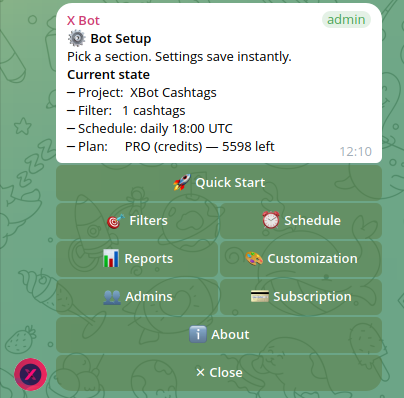
2. Open /setup#
Run /setup to reach the main menu.
3. Configure Filters Without a Cashtag#
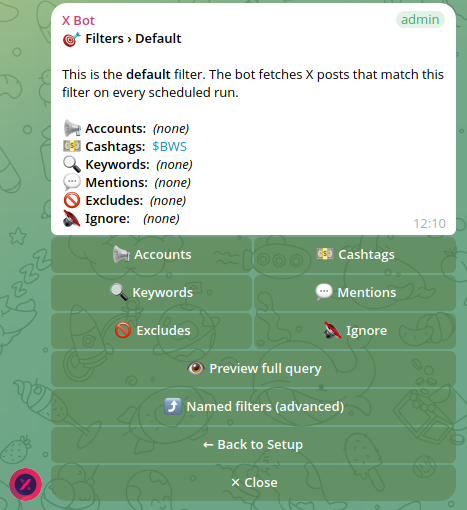
Tap 🎯 Filters to open the default filter. Instead of the Cashtags tab, this time you’re working with two other categories in the same filter:
- Keywords — free-text terms X Bot matches against post content. Add your project name, a campaign hashtag, and any narrative terms your team is pushing (e.g. “restaking,” “modular DA,” “intent-based swaps” — whatever language actually appears in the conversation you’re trying to catch).
- Mentions — posts that @-mention your official account. If your team already has an X handle live even without a token, add it here so replies and quote-tweets referencing you get picked up.

Both live inside the same “Default” named filter as accounts and cashtags — you’re not switching modes, you’re just populating different categories of the same filter. When the token eventually launches, you add cashtags to this filter rather than replacing anything.
4. Cut the Noise with Excludes and the Ignore List#
Keyword tracking is inherently noisier than cashtag tracking — you’re matching on words, not a precise token symbol, so some irrelevant posts will slip through. Two settings help:
- Excludes: turn off retweets, quotes, or replies if you only want original content. Pre-launch hype cycles generate a lot of low-effort retweets that don’t tell you much about who’s genuinely engaged.
- Ignore list: pre-launch periods attract scam-reply bots and copycat accounts baiting engagement off your announcements. Add known offenders to the ignore list so they stop cluttering your reports.
Neither eliminates false positives entirely — that’s the honest tradeoff of tracking by keyword instead of cashtag — but together they get you to a report that’s actually readable.
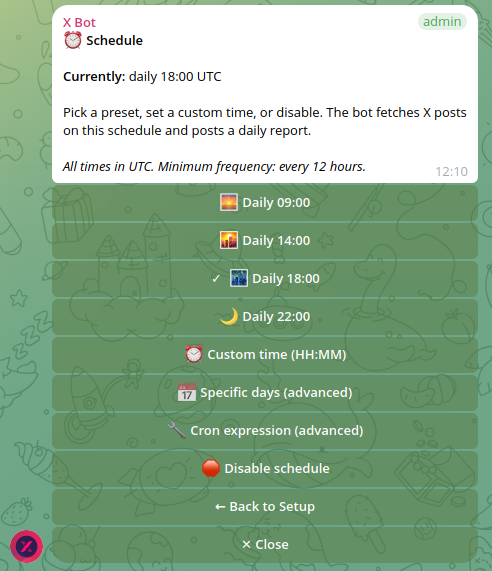
5. Set a Schedule#
Navigate to ⏰ Schedule and pick a cadence. Pre-launch campaigns tend to want tighter loops than steady-state monitoring — a daily report at a fixed time (say 14:00 UTC) is usually enough to track whether momentum is building week over week, without needing the 6-hour cadence that makes sense during an actual launch spike.
What a Pre-Launch Report Actually Tells You#
Each report scores tracked posts using X Bot’s configurable weights (likes, retweets, replies, quotes, views) and surfaces a leaderboard of who’s driving conversation, plus a “best tweet” — the single highest-scoring post of the period. Pre-launch, this answers questions that are otherwise hard to pin down:
- Is anyone outside your immediate team talking about the project yet?
- Which KOLs or community members are engaging organically, before you’ve paid anyone?
- Is your campaign hashtag actually catching on, or is it only your own account using it?
- Did last week’s announcement move the needle, or did engagement stay flat?
That last point matters for teams running a multi-week pre-launch campaign: comparing report-over-report scores gives you a rough trendline without needing a full analytics stack.
It also gives you a paper trail. If you’re negotiating with KOLs before a token exists — “post about us now, get paid or allocated once we launch” — a running report is evidence both sides can point to later, instead of relying on screenshots someone took (or didn’t take) at the time.
Auto-Relay Before Launch: Use It Sparingly#
The 📡 X Posts Auto-relay feature forwards posts from selected accounts into your Telegram chat within minutes of publication. It’s tempting to turn it on early so the team sees every mention live, but pre-launch keyword and mention tracking tends to be noisier than account-based tracking, and auto-relay doesn’t filter by keyword — it’s account-scoped. Reserve it for the handful of accounts you’re actively courting (partners, target KOLs) rather than trying to relay every keyword match; let the scheduled report carry the broader keyword/mention volume instead.
Real-World Scenarios#
Scenario 1: Stealth-to-Public Transition#
A team building in stealth starts posting teasers three weeks before their public announcement. They track their own handle’s mentions plus two or three narrative keywords tied to their positioning. When the public thread finally goes out, they already have a baseline for what “normal” engagement looked like pre-announcement, making the launch spike easy to quantify.
Scenario 2: Campaign Hashtag Buildup#
A project running a #ProjectNameTGE campaign with hired KOLs tracks the hashtag as a keyword alongside the KOL accounts. This is functionally similar to the account + cashtag combination described in the cashtag tracking guide, except the “cashtag” slot is filled by a hashtag keyword until the real cashtag exists — same additive filtering logic, same named-filter structure, just with placeholder terms.
Scenario 3: Rebrand or Relaunch#
An established project rebranding under a new name tracks the new project name and handle as keywords/mentions while the old cashtag is still technically live. This lets the team watch adoption of the new identity separately from legacy cashtag chatter, without waiting for the rebrand to be “official” everywhere.
Making the Jump to Cashtag Tracking#
Once the token launches, don’t start over — extend what’s already running. Go back into 🎯 Filters → the same Default filter (or the named filter you built) and add the new cashtag alongside the keywords and mentions you already configured. This gives you continuity: the same leaderboard, the same historical trend, now with a precise cashtag signal layered on top of the broader pre-launch terms. Most teams keep the keyword/mention layer running even after launch, since it still catches conversation that mentions the project by name without typing the cashtag.
For the full cashtag setup — including handling numeric-prefixed tokens and combining cashtags with account filters — see tracking cashtags for token projects. If you’re specifically coordinating hired KOLs through the launch itself, tracking X activity for a token launch covers that handoff in more detail.
Pricing for Pre-Launch Tracking#
Pre-launch volumes are usually modest — you’re tracking a handful of keywords and one handle, not a live token generating hundreds of daily mentions. Most teams stay comfortably within the FREE plan (100 posts/month) through the entire pre-launch phase. If a campaign hashtag goes wider than expected, X Bot’s PRO subscription ($19/month, including 1,000 posts, then $0.02/post metered) or pay-as-you-go ETH credit packs ($0.02/credit) scale up without requiring a plan change mid-campaign.
Common Pitfalls#
Keywords too generic. Tracking “airdrop” or “launch” alone will flood your reports with unrelated projects. Pair broad terms with something specific to your project (your name, your handle, your exact hashtag).
Forgetting to revisit after launch. Teams sometimes leave keyword tracking running exactly as configured pre-launch and never add the cashtag once it exists — missing the more precise signal cashtags provide.
Expecting cashtag-level precision. Keyword matching will always have more false positives than cashtag matching. That’s not a bug to fix, it’s the nature of tracking a project that doesn’t have a unique symbol yet.
If mentions or keywords seem to be missing posts, check X Bot’s troubleshooting docs or the setup menu reference for the full filter walkthrough — or reach out through ❓ Help & Support in /setup.
Ready to track your community on X? Add @BWS_X_Bot to your Telegram group, run /setup, and your first report fires on the configured schedule. The FREE plan covers 100 posts/month — no card required.
About this article: This post was drafted with AI assistance using X Bot’s content workflow and reviewed by Nacho Coll, Founder & Principal at Blockchain Web Services (BWS), before publishing. Every product claim is checked against the live bot. Read how we use AI in our content. Spot an error? Reach us via
/setup→ ❓ Help & Support.
About the author
Nacho Coll
Founder & Principal, Blockchain Web Services
Nacho leads the Blockchain Web Services (BWS) team that builds and operates X Bot — the Telegram bot that turns X (Twitter) activity into leaderboards for crypto communities. He writes about KOL performance tracking, the X API, and running analytics bots for Telegram groups, from the operator side of the wire. Building on blockchain and decentralized infrastructure since 2019.
- pre-launch community tracking
- keyword tracking telegram bot
- track brand mentions x
- pre-tge x monitoring