KOL Campaign Report Template for Crypto Projects (What to Include)
A KOL campaign report template for crypto teams: what to include, which X metrics matter, and how dated Telegram leaderboards supply the raw numbers.
 by Nacho Coll
Nacho leads the Blockchain Web Services (BWS) team that builds and operates X Bot — the Telegram bot that turns X (Twitter) activity into leaderboards for crypto communities.
The campaign ends, the posts are live, and now someone has to write the report. For an agency that someone is you, and the reader is a client who paid for a result and wants to know what they got. For an in-house team the reader is a founder or a treasury signer who approved the budget. Either way, the report is where a campaign is judged, and most of them are judged on whatever the writer remembered to collect while it was running.
This guide gives you a KOL campaign report template you can copy, explains what each section is for, and is honest about the part that is hard: getting trustworthy numbers without spending a weekend scrolling timelines. It also shows where a Telegram leaderboard bot like X Bot fits as the data source, and where it does not.
Start from the reader’s question#
A campaign report answers four questions, in this order:
- Did the KOLs do what we paid for? (deliverables)
- What did their posts earn? (engagement)
- What did it cost per outcome? (efficiency)
- What do we do differently next time? (learnings)
Anything that does not help answer one of those is decoration. A twelve-page deck with a logo wall and no dates fails the reader even if it looks expensive.
The template#
Copy this structure and fill it in. Each section is explained below.
CAMPAIGN REPORT: <project name> / <campaign name>
Period: <start date> to <end date>
Prepared by: <your name or agency>
Prepared on: <date>

1. Summary (five lines maximum)
2. Brief recap
3. Deliverables: agreed vs delivered
4. Engagement by KOL
5. Best posts
6. Cost per outcome
7. What we could not measure
8. Learnings and next steps
1. Summary#
Write this last, put it first. Five lines: the period, how many KOLs took part, total posts delivered against total agreed, the headline engagement figure, and one sentence on the main takeaway. Most readers stop here, so it has to stand alone.
2. Brief recap#
Two or three sentences restating what the campaign was meant to do and what each KOL was asked to deliver. This protects you in both directions. It stops the client from retrofitting new goals after the fact, and it reminds you of the actual agreement when memory has drifted.
3. Deliverables: agreed vs delivered#
A simple table, one row per KOL.
| KOL | Posts agreed | Posts delivered | Required tag or cashtag used | Notes |
|---|---|---|---|---|
| 3 | 3 | Yes | One post deleted after 2 days | |
| 2 | 1 | Partly | Missed the required mention |
This is the section clients read most closely, because it decides whether anyone gets paid in full. If you want the longer version of this step, the proof checklist in verify KOL deliverables before you pay covers what counts as acceptable evidence.
4. Engagement by KOL#
For each KOL, report the engagement their campaign posts earned in the period. Likes, reposts, replies, quotes and views are the raw ingredients. The mistake to avoid is adding them up as if they were equal. A like costs a reader one tap; a quote post costs them a sentence and puts the project in front of their own followers. A single weighted score per KOL makes the comparison readable, as long as you state the weights in the report so the client can see how the ranking was produced.
5. Best posts#
Pick the top two or three posts and say why they worked: the hook, the format, the time of day, whether the KOL replied to comments. This is the section that makes a report useful rather than merely accurate, because it is what the next brief gets built from.
6. Cost per outcome#
Divide what you paid each KOL by something countable: posts delivered, total engagement, or weighted score. Cost per post is the weakest figure because it ignores results. Cost per weighted engagement point is more honest, with one caveat: compare KOLs only inside the same campaign, with the same weights, over the same dates. Across campaigns the numbers drift for reasons unrelated to the KOL.
7. What we could not measure#
This is the section most reports leave out and the one that earns the most trust. State plainly what the data does not cover: sales or token purchases that followed, sentiment inside private groups, conversations that happened off X, and reach beyond what the platform reports. A client who sees the limits stated upfront believes the numbers that are stated.
8. Learnings and next steps#
Three to five bullets. What to repeat, what to drop, which KOLs to rebook, what to change in the brief. Keep it to decisions, not observations.
The hard part is the data, not the template#
Sections 3 to 6 all depend on numbers that were captured while the campaign ran. Reconstructing them afterwards has three recurring problems:
- Posts get deleted or edited. A KOL removes a post after the payment conversation starts and the evidence goes with it.
- Engagement keeps moving. Counting a post on day 2 and on day 20 gives different figures, so two reports on the same campaign disagree unless the counting date is fixed.
- Nobody applied the same method to every KOL. One person screenshotted, another copied numbers into a spreadsheet, a third eyeballed it.
The fix is boring and effective: capture the same data, the same way, on a fixed schedule, from the first day. That is the whole job a leaderboard bot does for this use case.
Using X Bot as the data source#
X Bot is a Telegram bot that fetches X posts on a schedule, scores them, renders a leaderboard image and posts it into your chat. For a campaign, the setup is small:
- Add @BWS_X_Bot to the campaign’s Telegram group, promote it to admin and run
/setup. - Open
🎯 Filtersand track the KOLs’ handles withfrom:, plus the cashtag or mention the brief requires. If you manage several clients, use named filters so each one gets its own report (see tracking multiple KOL clients in one Telegram group). - Open
⏰ Scheduleand pick a daily preset, or a custom time and days. There is a 12-hour minimum interval between fires, so plan on one or two reports a day, not a live feed. - Open
🎨 Customizationto set the project name, logo and colors so the images can go straight into your report.
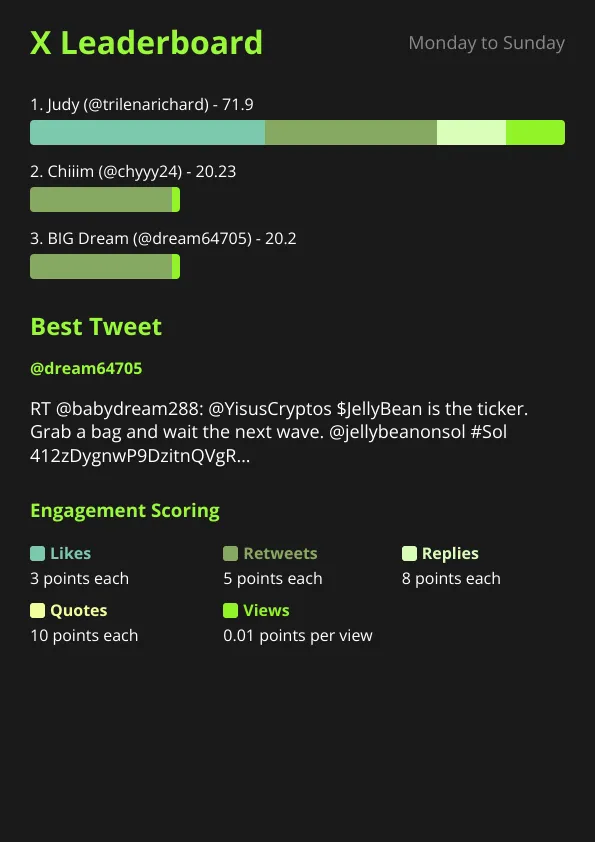
Each report image ranks the people matched by your filters using a per-user score and highlights the best tweet of the period. The default weights are likes 3, retweets 5, replies 8, quotes 10 and views 0.01, so conversation outranks amplification and views barely register. You can override them per chat with /set_points or in /setup under 🎨 Customization. If you change them, write the new values into section 4 of your report.
A worked example with the defaults: a post with 40 likes, 6 retweets, 5 replies, 2 quotes and 5,000 views scores (40 x 3) + (6 x 5) + (5 x 8) + (2 x 10) + (5,000 x 0.01) = 120 + 30 + 40 + 20 + 50 = 260 points. Notice that 5,000 views contribute only 50 points, less than the 7 replies and quotes combined (60). That is deliberate, and it is worth one sentence in the report so a client does not assume views drive the ranking.
Mapping the reports onto the template#
| Report section | Where the data comes from |
|---|---|
| 3. Deliverables | The dated report images show which tracked handles posted matching content in each period |
| 4. Engagement by KOL | The per-user score on each report image |
| 5. Best posts | The best tweet picker on each report (see how the best tweet picker works) |
| 6. Cost per outcome | Your payment records divided by the scores |
| 7, 8 | Your own judgment |
Because the images are posted in the group on a schedule, you end up with a dated trail without anyone having to remember to take a screenshot. Pull the final images into the report, and you can generate an extra one at any time if you need a closing snapshot (see pulling an on-demand report).
For client-facing delivery, the branding settings let the images carry the client’s name and logo; white-labeling X Bot reports for clients covers the details and the one limit worth knowing, that branding is per chat.
Where X Bot is the wrong tool#
Being straight about this matters, because a campaign report built on the wrong data is worse than none.
- It measures X activity, not outcomes. It will not tell you how many people bought a token, joined a Discord or clicked a link. If the client’s goal is conversions, you need link tracking or on-chain attribution alongside it.
- It only sees what your filters match. A KOL who posts without the required cashtag, mention or from-account rule will not appear, which is useful for enforcement but means a badly configured filter produces an empty-looking campaign.
- It is not a payment or contract system. It gives you a record; the agreement and the payment still live elsewhere.
- Scores are relative, not absolute. A leaderboard says who did better than whom in your chat. It does not say whether the whole campaign was good compared with the market.
- Volume has a price. The FREE plan covers 100 posts a month, so a large KOL roster over several weeks may need a paid plan. How X Bot pricing works lays out the options.
If your campaign is three KOLs and a client who only wants a one-page summary, a spreadsheet may be enough. The bot starts paying for itself when there are many KOLs, a long window, or a client who will question the numbers.
A quick pre-flight checklist#
Before the next campaign starts:
- Write the brief recap and the deliverables table before day one, not after.
- Decide the counting date for engagement and put it in the report.
- Set the filters and schedule on day one so the record starts at the beginning.
- Agree the scoring weights with the client up front, then do not change them mid-campaign.
- Reserve section 7 for what you cannot measure, and fill it in honestly.
For the bot’s own setup screens, the setup menu docs list every option.
Ready to track your community on X? Add @BWS_X_Bot to your Telegram group, run /setup, and your first report fires on the configured schedule. The FREE plan covers 100 posts/month — no card required.
About this article: This post was drafted with AI assistance using X Bot’s content workflow and reviewed by Nacho Coll, Founder & Principal at Blockchain Web Services (BWS), before publishing. Every product claim is checked against the live bot. Read how we use AI in our content. Spot an error? Reach us via
/setup→ ❓ Help & Support.
About the author
Nacho Coll
Founder & Principal, Blockchain Web Services
Nacho leads the Blockchain Web Services (BWS) team that builds and operates X Bot — the Telegram bot that turns X (Twitter) activity into leaderboards for crypto communities. He writes about KOL performance tracking, the X API, and running analytics bots for Telegram groups, from the operator side of the wire. Building on blockchain and decentralized infrastructure since 2019.
- kol campaign report
- kol campaign report template
- crypto kol campaign results
- kol campaign tracker