Team Advocacy on X: Track Your Staff's Project Posts
Track how your own team and core contributors amplify the project on X. Set up an internal Telegram leaderboard, tune the scoring and keep it friendly, not competitive.
 by Nacho Coll
Nacho leads the Blockchain Web Services (BWS) team that builds and operates X Bot — the Telegram bot that turns X (Twitter) activity into leaderboards for crypto communities.
Most crypto projects spend real money on outside voices: KOLs, ambassadors, paid raids. Meanwhile the people with the most credibility, your own founders, developers, moderators and core contributors, post about the project on X whenever they happen to remember. Nobody measures it, so nobody notices when it quietly stops.
This guide covers a small, inexpensive fix: an internal leaderboard of what your own team posts, delivered into a private Telegram chat. It is not a performance review. It is a mirror that shows the team what their posts do, and a nudge that makes the habit stick.
If you are tracking outside people instead, see running a weekly ambassador leaderboard. The setup here is similar but the audience, tone and privacy are different, and that difference is most of what this article is about.
Why track your own team at all#
Three reasons come up repeatedly.
Consistency. A team that posts once a week each is a very different asset from a team that posts in bursts around announcements. You cannot improve what you cannot see, and a weekly report makes gaps visible without anyone having to scroll through ten timelines.
Learning. The report highlights the best performing tracked post of the period. Over a few weeks that tells you which kinds of posts your audience actually reacts to: a developer explaining a fix, a short thread on a roadmap item, a plain announcement. That is free market research on your own audience.
Recognition. Contributors who are not on the founding team, such as community moderators and volunteer translators, rarely get public credit. A visible, regular ranking where their posts show up alongside the founders’ is a cheap way to say that their work is seen.
What it should not be#
Be careful here, because this is the easiest place to do harm.
An engagement score measures how the audience reacted, not how well someone does their job. A support engineer who spends the day helping users has no reason to post viral content, and a ranking that implies otherwise is unfair. Do not use the leaderboard in performance conversations, and do not tie compensation to it.
Say this out loud when you introduce it. A line such as “this is for fun and for learning what lands, not for evaluation” saves you weeks of awkwardness. Participation should be opt-in: only add the handles of people who have agreed to be tracked.
Step 1: Create a private chat for the report#
Create a Telegram group that contains only the team, add @BWS_X_Bot, promote it to admin and run /setup. The installation guide covers the permissions.
Keeping this separate from your public community chat matters. The point is a relaxed place where a quiet week is not embarrassing. If your team already uses a group with forum topics, you can send the report to a dedicated topic instead, as described in sending X Bot reports to a forum topic.
If you give several colleagues access to configure the bot, see adding X Bot admins without losing group ownership.
Step 2: Add the team handles#
In /setup, tap 🎯 Filters, then use 📢 Accounts to add the X handles of the people who opted in.
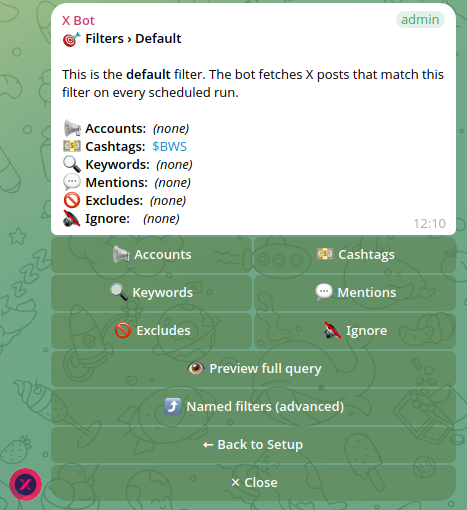
Using accounts rather than a cashtag or keyword is the right choice here. You are asking “what did our people post?”, not “who mentioned the project?“. An accounts filter also avoids the noise that comes with open mentions: critics, spam and unrelated accounts never appear.
One consequence to be aware of: the filter tracks the posts of those accounts, and not all of those posts will be about your project. A developer who also tweets about football will have football posts in the pool. If that distorts the board, you can combine the accounts with a cashtag or keyword so that only relevant posts count. When you combine conditions, how they combine matters a lot, and a mismatch is the classic cause of an empty report. Read Match ANY vs Match ALL filters explained first.
Step 3: Exclude the posts you do not want counted#
Inside 🎯 Filters you can exclude retweets, quotes or replies, and you can maintain an ignore list for specific accounts.
For a team board, the most useful choice is usually excluding retweets. Otherwise someone who reposts every official announcement collects points for work the official account already did, and the ranking drifts toward whoever is fastest on the retweet button. Excluding retweets rewards people who write their own posts.
Think before excluding replies. For a team, replies are often the best content: a founder answering a question publicly is exactly what you want more of. If you do exclude them, you remove that signal from the ranking.
Do not change anything in week one. Run a report, look at what rises to the top, and only then adjust. The guide to cleaning up noisy reports shows how each option behaves.
Step 4: Pick a calm schedule#
Tap ⏰ Schedule. The presets are daily at 09:00, 14:00, 18:00 and 22:00 UTC, and you can also set a custom time, specific days of the week or a full cron expression. Times are in UTC and the minimum interval between fires is 12 hours.
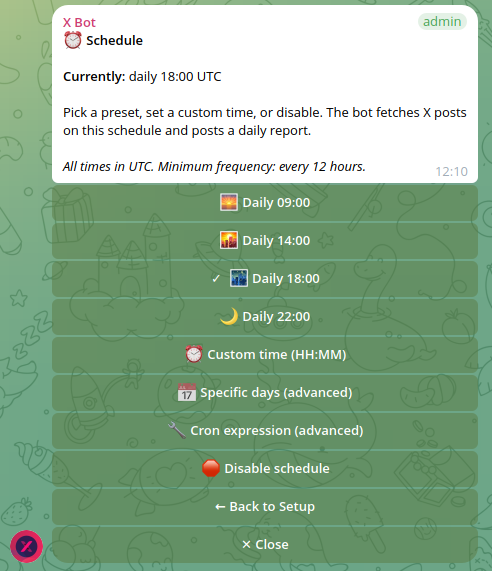
For an internal board, weekly is plenty. A Friday afternoon report in your team’s time zone makes a natural end-of-week moment. A daily report on a small team is mostly noise and starts to feel like surveillance. If you need an expression for a specific day and hour, the custom schedules guide has worked examples.
Remember to convert to UTC. A team spread across several time zones should pick one reference time and accept that it will be morning for some and evening for others.
You can also trigger a report whenever you like from /setup, which is handy right after a launch day to see how everyone’s posts landed.
Step 5: Set the period and the weights#
The period decides which posts are included, and it is independent of the schedule. A rolling seven-day window matches a weekly report: each report looks at the last seven days, and older posts age out automatically.
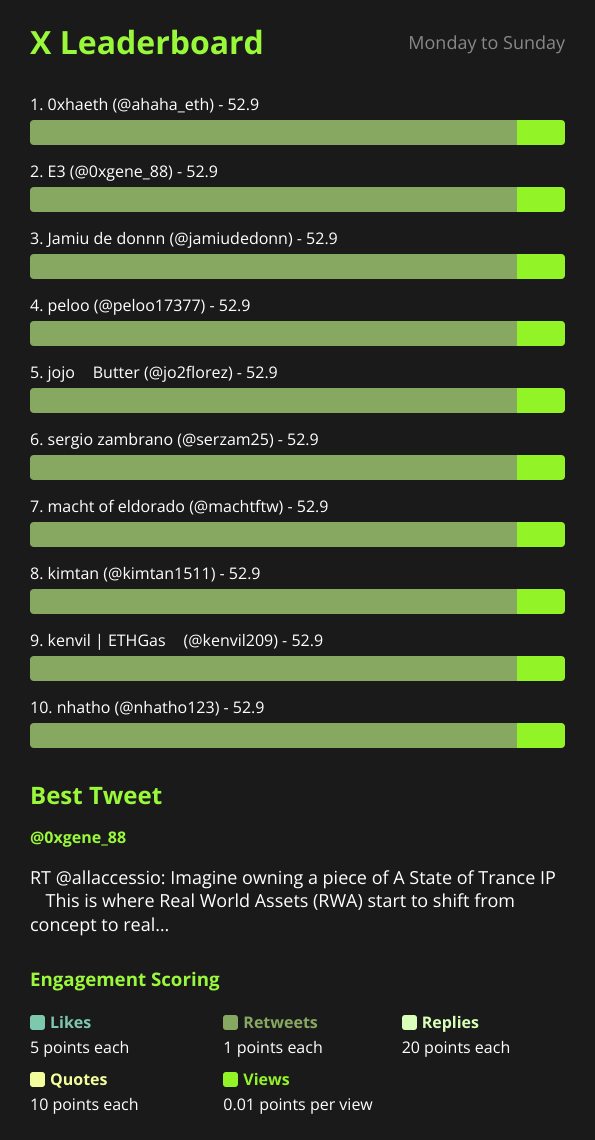
The default weights are likes=3, retweets=5, replies=8, quotes=10, views=0.01. Conversation is worth more than amplification, and views barely count. For a team board that is a good default, because it favours posts that start discussion over posts that merely reach many timelines.
Here is a worked example with those defaults. One team member’s week adds up to 25 likes, 4 retweets of their posts, 3 replies, 1 quote and 2,000 views:
- Likes: 25 x 3 = 75
- Retweets: 4 x 5 = 20
- Replies: 3 x 8 = 24
- Quotes: 1 x 10 = 10
- Views: 2,000 x 0.01 = 20
Total: 75 + 20 + 24 + 10 + 20 = 149 points.
Weights can be changed per chat under 🎨 Customization, covered in customizing leaderboard score weights. In the same menu you can set how many people appear on the board. For a team, showing everyone who opted in is friendlier than a top three that only ever names the same people.

Step 6: Use the report, not just the ranking#
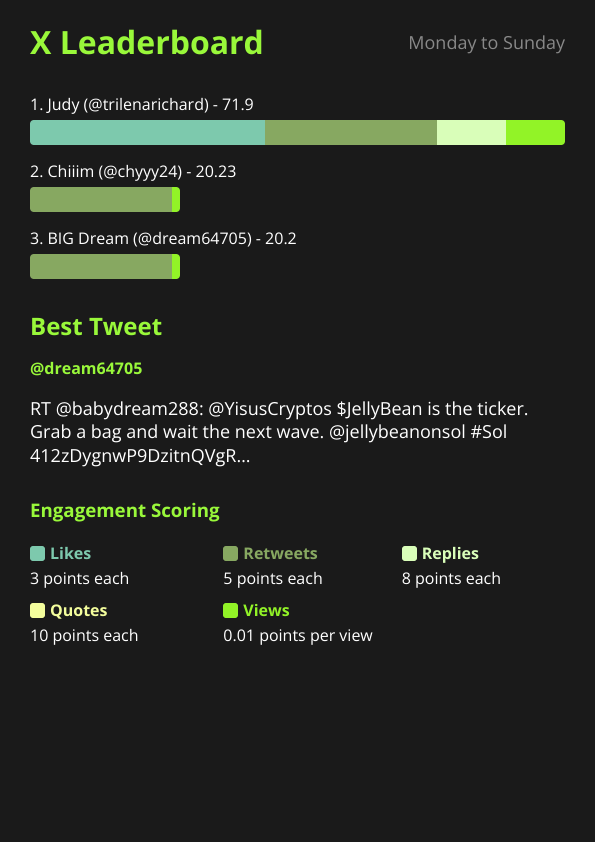
The most useful part of the report for a team is often not the ranking. Look at the best tweet of the period and talk about it. Why did that one land? Was it the topic, the format, the timing, the person? A five-minute conversation in the chat each week turns a scoreboard into a feedback loop.
Some habits that keep it healthy:
- Celebrate the best post, not the top scorer. Naming a good post teaches everyone; naming a winner invites rivalry.
- Let people drop out quietly. If someone asks to be removed, take the handle off the filter and do not comment.
- Watch for gaming. If the team starts engaging mostly with each other to lift scores, the board is measuring your group chat, not your audience. Gently say so.
- Pair it with guidance. A short pinned note on what good posts look like gives people something to aim at beyond the number.
The best tweet picker deep dive explains how that highlighted post is chosen.
Costs and limits#
Team tracking is cheap because the list of accounts is short. The FREE plan covers 100 posts per month with a hard cap, which can be enough for a small team reporting weekly, though a team that posts a lot will reach it. The PRO subscription is $19 per month and includes 1,000 posts, with metered overage after that at $0.02 per post. ETH credit packs cost $0.02 per credit and never expire. How X Bot pricing works explains how these layer, and you can check usage at any time with the steps in checking your credit usage.
When X Bot is the wrong tool#
- If your team does most of its public work on other platforms, an X-only board will undercount it.
- If people have private or protected accounts, or have not agreed to be tracked, do not add them.
- If the team is two or three people, you probably do not need a bot. Just look at their profiles.
- If you want to judge content quality or message discipline, an engagement score cannot do that.
For a team of ten or more where the habit matters and nobody has time to compile a report, a weekly automatic summary is a light-touch way to keep everyone posting.
If something does not behave as described, the troubleshooting guide covers the usual causes before you need to open a ticket.
Ready to track your community on X? Add @BWS_X_Bot to your Telegram group, run /setup, and your first report fires on the configured schedule. The FREE plan covers 100 posts/month — no card required.
About this article: This post was drafted with AI assistance using X Bot’s content workflow and reviewed by Nacho Coll, Founder & Principal at Blockchain Web Services (BWS), before publishing. Every product claim is checked against the live bot. Read how we use AI in our content. Spot an error? Reach us via
/setup→ ❓ Help & Support.
About the author
Nacho Coll
Founder & Principal, Blockchain Web Services
Nacho leads the Blockchain Web Services (BWS) team that builds and operates X Bot — the Telegram bot that turns X (Twitter) activity into leaderboards for crypto communities. He writes about KOL performance tracking, the X API, and running analytics bots for Telegram groups, from the operator side of the wire. Building on blockchain and decentralized infrastructure since 2019.
- employee advocacy crypto
- team x posts tracking
- staff twitter engagement telegram
- internal x leaderboard